
Apps
Program apps
The reference for developers who write an app themselves: the .nxa package and its manifest, the .nxd document format, what an app may do inside the sandbox, the message protocol between app and nexxus, how the AI Assistant and co-editors change your documents, and how to test and publish.
An app is one HTML file and one description file. The HTML draws a document and reports the user’s edits. Everything else is done by nexxus: loading and saving the document, versions, sharing, live co-editing, the assistant, permissions. Your app never touches storage and never sees the network. That keeps apps small, and it is why nexxus lets anyone install them.
This page is the contract. It describes what ships in nexxus today.
nexxus
- FilesLoads and saves the .nxd document, keeps its versions
- Co-editorsTheir changes arrive while the app is open
- AI AssistantWrites schema-checked changes to the data
Your app
app.html in a sandboxed frame, no network, no storage
- nxd:init
- nxd:apply
- nxd:change
- nxd:export
Back to nexxus
- EditsThe whole new data with every committed change
- Files to saveAn image, an HTML page, a JSON export
- Questions for the AI AssistantThe element the user points at
The package (.nxa)
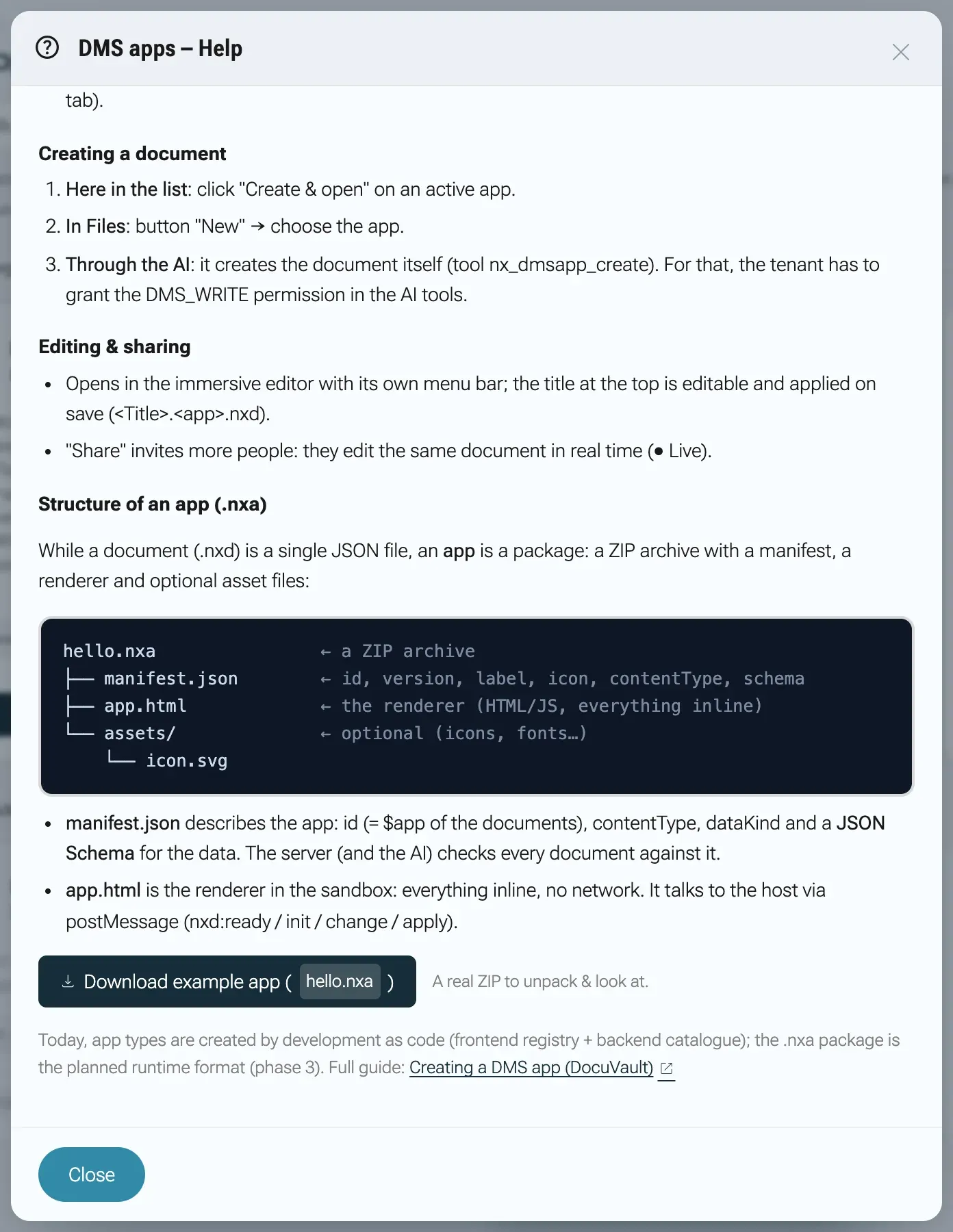
Section titled “The package (.nxa)”An app is shipped as a ZIP file with the ending .nxa. nexxus reads two entries from it, found by their file names anywhere in the archive:
Directoryhello.nxa a ZIP archive
- manifest.json id, version, label, icon, content type, data schema
- app.html the renderer, everything inline
Other entries are ignored. Build the package with any ZIP tool, for example:
zip -j hello.nxa manifest.json app.htmlThe in-app help has a working example: on StartApps, Help and then Download example app save hello.nxa. Every download carries a fresh ID such as hello-ab12c, so the example can be installed more than once in a tenant.
The manifest
Section titled “The manifest”manifest.json describes the app. nexxus checks it completely before it stores anything, on upload, on a new version and when the AI Assistant registers an app.
This is the manifest of the example app, as nexxus generates it:
{ "id": "hello-ab12c", "version": 1, "label": "Hallo-App", "icon": "waving_hand", "contentType": "application/json", "dataKind": "json", "schema": { "type": "object", "additionalProperties": false, "properties": { "text": { "type": "string", "description": "Der angezeigte Text." } }, "required": ["text"] }}Field reference
Section titled “Field reference”| Field | Type | Required | Meaning |
|---|---|---|---|
id | string | yes | The app’s ID, and the $app value of its documents. 2 to 40 characters, lowercase letters, digits and hyphens, starting with a letter ([a-z][a-z0-9-]{1,39}). Unique per tenant. board and markdown are reserved for the built-in apps. |
label | string | yes | The name on the card, in the New menu of Files and on the document page. |
contentType | string | yes | How the data is described, for example application/json, text/markdown, text/plain or application/xml. |
dataKind | "json" or "text" | yes | json: data is a JSON value checked against schema. text: data is a string. |
schema | object | for json apps | A JSON Schema (draft 2020-12) for data. nexxus compiles it on upload and checks every document the AI Assistant creates or changes against it. Text apps get {"type": "string"}. |
description | string | no | Shown on the app’s card and given to the AI Assistant. |
icon | string | no | A Material icon name for the card. Default apps. |
color | string | no | The card’s colour as hex. Default #1565C0. |
version | integer | no | The app’s version, default 1. Every new upload must carry a higher number. |
defaultData | any | no | The content of a new document. Without it, a new document starts with {} (json) or an empty string (text), and your app has to render that. |
aiInstructions | string | no | Guidance for the AI Assistant on how to build a good document, at most 8000 characters. |
changelog | array | no | What each version changed, shown before a release and in the version history. |
capabilities | object | no | Opt-ins for the frame around the app: tabs and assistant. |
contributes | object | no | Menu entries the app adds to the bar above it. At most 256,000 bytes. |
app.html must not be empty and may be at most 2,000,000 bytes (UTF-8).
The data schema
Section titled “The data schema”The schema is the contract between your app, nexxus and the AI Assistant. Three things follow from it:
- nexxus rejects any document from the AI Assistant that does not match. The AI Assistant gets the error message and can correct its change.
- The AI Assistant learns your data model from the schema. Put a
descriptionon every property. That is where the AI Assistant reads what a field means, which units it uses and which values make sense. - Documents outlive app versions. Add new properties as optional, so documents created with an older version stay valid.
Keep defaultData empty or minimal. When the AI Assistant is asked to build something in a new document, it is told to replace unchanged starting content. A demo board that never goes away is still the most common complaint about starting content. Put onboarding into your app’s empty state instead. nexxus does not check defaultData against the schema on upload, but the AI Assistant’s create tool does, so a defaultData that breaks the schema makes it fail on new documents.
aiInstructions
Section titled “aiInstructions”The schema says what is valid. aiInstructions says what is good: layout rules, sizes, conventions, the mistakes models tend to make with your data. nexxus gives the text to the AI Assistant together with the schema whenever someone works on one of your documents, and returns it from the app list tool. On the app’s page, the owner can add an addendum for their tenant; the AI Assistant gets your text first, then the addendum.
changelog
Section titled “changelog”One entry per version, newest first. version is an integer of at least 1, changes a non-empty list of non-empty strings, date optional in the form YYYY-MM-DD. Other keys are ignored. These are the two newest entries of the Whiteboard app:
"changelog": [ { "version": 7, "date": "2026-10-04", "changes": [ "Die App bringt einen Changelog mit. Er erscheint beim Hochladen einer neuen Version und in der Versionshistorie.", "Die Hinweise für den KI-Assistenten erklären jetzt auch Standardgrößen, wie das Board überlappende Elemente nachbessert, Frames als Spalten und typische Fehler wie doppelte ids." ] }, { "version": 6, "date": "2026-10-03", "changes": [ "Hell und Dunkel folgen dem Modus der Anwendung, in der das Board läuft.", "Wer in der App selbst umschaltet, behält diese Wahl für das Whiteboard." ] }]When someone uploads a new version, the dialog lists every entry newer than the installed version, up to the package’s. The version history on the app’s page takes each version’s entry from the newest uploaded manifest that has one, so a full changelog in a new release fills in older versions too. Write the bullets for the people who use the app: one concrete change each.
capabilities
Section titled “capabilities”| Key | Type | Default | Effect |
|---|---|---|---|
tabs | boolean | false | nexxus shows a row of tabs above the app. The opened document is the first tab, + opens a picker with the other documents of the same app and Blank document. Switching tabs loads the app afresh with the other document. |
assistant | boolean | true | false declares that the app’s documents are not meant for the AI Assistant. The switch Assistant for this app on the app’s page then stays off and cannot be turned on until a version allows it. |
Unknown keys are ignored. Absent means off, except for assistant.
contributes
Section titled “contributes”An app can add commands to the bar above it, either into the standing File menu or as menus of its own. A click is sent to the app as nxd:command with the command’s ID. This is the block of the BPMN process editor:
"contributes": { "commands": [ { "id": "process.validate", "title": "BPMN prüfen", "category": "Prozess" }, { "id": "process.export.svg", "title": "Als SVG exportieren", "category": "Datei" } ], "menus": { "datei": [ { "command": "process.export.svg", "group": "export" } ], "menubar": [ { "id": "prozess", "title": "Prozess", "items": [ { "command": "process.validate" } ] } ] }}commandsdeclares commands withidandtitle. The first declaration of an ID wins. The IDs__proto__,constructorandprototypeare refused.menus.dateiappends items to the File menu, grouped bygroupand sorted byorder.dateiis the only standing menu an app can extend.menus.menubaradds menus of its own, each withid,title,itemsand an optionalorder. At most 8 menus with 24 items each are shown.- nexxus never rejects a manifest for a bad menu entry. It drops what it cannot resolve (an unknown command, a menu it does not allow) and warns in the browser console. It only relays command IDs that survived this check.
The document (.nxd)
Section titled “The document (.nxd)”A document is a JSON file in Files, wrapped in a small envelope:
{ "$app": "board", "$v": 1, "contentType": "application/json", "meta": { "title": "Messe 2026" }, "data": { "columns": [ { "id": "todo", "title": "To-do" } ], "cards": [] }}| Field | Type | Meaning |
|---|---|---|
$app | string | The ID of the app that opens the document. Required: without it nexxus shows Invalid .nxd file: field “$app” is missing. |
$v | number | Version of the envelope format, currently 1. |
contentType | string | Copied from the manifest. |
meta.title | string | The document’s title. It is also part of the file name. |
data | object or string | Your app’s content: what schema describes for json apps, a string for text apps. |
The file name is <title>.<app ID>.nxd, for example Messe 2026.board.nxd. nexxus reads the app ID from the file name when the document is created and uses it to find the app’s documents. Which app opens a document is decided by $app, not by the name. A file that is not valid JSON shows Invalid .nxd file: not valid JSON.
Your app only ever sees data (and the title in meta). The envelope is nexxus’s business.
Inside the sandbox
Section titled “Inside the sandbox”nexxus loads app.html into an iframe with sandbox="allow-scripts": your code runs, but without the origin of nexxus, so it has no cookies, no session and no access to the page around it. In front of your HTML, nexxus puts this content security policy:
default-src 'none'; script-src 'unsafe-inline'; style-src 'unsafe-inline'; img-src data: blob:;font-src data:; media-src data: blob:; form-action 'none'; base-uri 'none'What that means for your code:
| Works | Does not work |
|---|---|
Inline <script> and <style>, everything in the one HTML file | Any network request: fetch, WebSocket, external scripts, stylesheets, web fonts, images from a URL |
Images and fonts as data: or blob: URLs | localStorage, sessionStorage, cookies (the frame has no origin) |
<input type="file">, paste and drag and drop | alert, confirm, prompt (blocked in the sandbox): build your own dialogs |
| Canvas, SVG, everything the browser draws | Downloading a file directly: hand it to nexxus with nxd:export |
The document’s data is your only state. Pictures a user adds belong in data, compressed in the browser, and large amounts of raster data belong in Files as their own documents.
The protocol
Section titled “The protocol”The app and nexxus talk over a private MessageChannel. The handshake has three steps, then messages flow both ways over the port.
- 1nxd:ready (to the parent window)Your app → nexxus page
- 2nxd:connect with a MessagePortnexxus page → Your app
- 3nxd:init: data, title, readonlynexxus page → Your app
- 4The person editsYour app
- 5nxd:change with the whole dataYour app → nexxus page
- 6Live to the others, saved after about 1.5 snexxus page → nexxus server
- 7The change arrives at the co-editornexxus server → Co-editor
- 8The co-editor changes somethingCo-editor → nexxus server
- 9Relayed to this pagenexxus server → nexxus page
- 10nxd:apply with origin 'peer'nexxus page → Your app
Messages
Section titled “Messages”| Direction | Message | Meaning |
|---|---|---|
| app to nexxus (window) | {type: 'nxd:ready'} | The app has booted and wants its channel. |
| nexxus to app (window) | {type: 'nxd:connect'} with a MessagePort in ports[0] | Keep the port, it carries everything else. |
| nexxus to app | {type: 'nxd:init', doc, meta, readonly, hostCapabilities} | The document’s data as doc, meta with the title, readonly, and what this host supports, today {assist: true} or {assist: false}. |
| nexxus to app | {type: 'nxd:apply', doc, origin} | Someone else changed the document. origin is 'ai' for the AI Assistant and 'peer' for a co-editor. Treat a missing origin as 'peer'. |
| app to nexxus | {type: 'nxd:change', doc} | The user changed something. Send the whole new data. Ignored while the document is read-only. |
| nexxus to app | {type: 'nxd:command', id} | The user clicked one of your menu entries. |
| app to nexxus | {type: 'nxd:export', filename, mime, data} | Save a file for the user. |
| app to nexxus | {type: 'nxd:assist', context, message} | Hand the element the user points at to the AI Assistant. |
| app to nexxus | {type: 'nxd:presenting', on} | A full-screen show started (true) or ended (false). |
| nexxus to app | {type: 'nxd:theme', mode, pref} | Light or dark: mode is the mode of nexxus, pref this person’s choice for your app. |
| app to nexxus | {type: 'nxd:theme-pref', pref} | The person used your app’s light or dark switch. |
A complete minimal app
Section titled “A complete minimal app”This is the app.html of the example app. It renders one text field, reports every keystroke and takes changes from others:
<!doctype html><html lang="de"><head><meta charset="utf-8"><style> body{font:15px/1.5 -apple-system,system-ui,sans-serif;margin:0;display:grid;place-items:center;height:100vh} input{font-size:20px;padding:10px 14px;border:1px solid #cbd5e1;border-radius:10px}</style></head><body> <input id="t" placeholder="Text eingeben"> <script> var port=null, state={text:""}; var t=document.getElementById("t"); function render(){ if(t.value!==(state.text||"")) t.value=state.text||""; } function emit(){ if(port) port.postMessage({type:"nxd:change", doc: state}); } t.addEventListener("input", function(){ state.text=t.value; emit(); }); function handle(m){ if(!m) return; if(m.type==="nxd:init"){ state=m.doc||{text:""}; t.readOnly=!!m.readonly; render(); } if(m.type==="nxd:apply"){ state=m.doc||{text:""}; render(); } } window.addEventListener("message", function(e){ if(e.data && e.data.type==="nxd:connect" && e.ports[0]){ port=e.ports[0]; port.onmessage=function(ev){handle(ev.data);}; } }); (window.parent||window).postMessage({type:"nxd:ready"}, "*"); </script></body></html>Rules every app follows
Section titled “Rules every app follows”- Respect
readonly. Hide every editing control when it istrue: palettes, handles, delete buttons. One CSS class on<body>is easier to keep complete than a check per button. Keep reading, searching, zooming and exporting. nexxus enforces write rights on the server and dropsnxd:changefrom a read-only document, soreadonlyis about not offering what would fail. - Treat every
nxd:initas a fresh start. Reset your state from it. Hosts can send it more than once. - Do not clobber active input on
nxd:apply. When a co-editor’s change arrives while the user is typing in a field, keep the user’s text in that field. The example’srender()only writes the field when the value differs. - Send
nxd:changefor every committed edit, with the complete data. Debounce keystroke streams. - Read
hostCapabilitiesleniently. Absent means the host cannot. Offer a feature only when the host announces it.
Saving files: nxd:export
Section titled “Saving files: nxd:export”The sandbox cannot download files, so your app hands them to nexxus:
port.postMessage({ type: 'nxd:export', filename: 'board.svg', mime: 'image/svg+xml', data: svgString });data may be a string, an ArrayBuffer, a typed array or a Blob, passed as bytes and never base64. nexxus does not look at the format. It checks:
- The export must follow a real click inside your app. An export without a recent click is dropped.
- At most 50 MB.
- At least one second between exports, at most 20 per minute. Otherwise the user sees Too many exports in a short time. Please wait a moment.
mimemust have the shapetype/subtype. The file name is reduced to a plain name of at most 200 characters (no paths, no control characters, no leading dots). An invalid message shows Export failed: the app delivered invalid data.- On a public link that forbids downloads, the user sees Downloads are not allowed for this link.
Asking the AI Assistant about one element: nxd:assist
Section titled “Asking the AI Assistant about one element: nxd:assist”Your app cannot reach a model. It can say what the user is pointing at:
port.postMessage({ type: 'nxd:assist', context: { focus: { kind: 'block', id: 'b-7', label: 'Tabelle', path: 'Abschnitt „Liste“ › Tabelle', data: node }, summary: 'Auftragstabelle mit 4 Spalten', excerpt: '<table class="orders">...</table>' }, message: 'Diese Tabelle ist zu breit.'});nexxus shows the element as the conversation’s focus, opens the AI Assistant and puts message into the input field without sending it: the user still chooses the model and the wording. The focus travels with every following message until the user moves on. kind is yours to define (block, slide, entity). Send markup in excerpt rather than describing a picture, because nexxus cannot capture your frame and markup tells a model more.
Everything crossing the sandbox is treated as untrusted and cut to size: label to 120 characters, kind to 40, path and summary to 300, excerpt to 2000 and data to 4000 characters of JSON.
Offer the hand-over only when nxd:init carried hostCapabilities.assist === true. It is false where no assistant is available, for example when the assistant is switched off for your app. Without it, show the context for the user to copy, rather than a button that does nothing.
Light and dark: nxd:theme
Section titled “Light and dark: nxd:theme”Your app’s controls (toolbars, side panels, dialogs) should follow nexxus until the person switches inside your app. The content itself keeps its own look. nexxus sends nxd:theme after every nxd:init and whenever either value changes:
const look = { host: 'light', pref: 'auto' };const dark = () => (look.pref === 'auto' ? look.host : look.pref) === 'dark';// on nxd:theme: look.host = m.mode; look.pref = m.pref; apply()// own switch: const next = dark() ? 'light' : 'dark';// look.pref = next === look.host ? 'auto' : next;// port.postMessage({ type: 'nxd:theme-pref', pref: look.pref }); apply()nexxus keeps the choice per person and app in the person’s settings and sends it back with the next nxd:theme. Never store it in data: it belongs to the person, not to the document. Switching back to the mode of nexxus means pref: 'auto'.
Presenting: nxd:presenting
Section titled “Presenting: nxd:presenting”Send {type: 'nxd:presenting', on: true} when your app starts a full-screen show and on: false when it ends. nexxus hides the other people’s pointers in the meantime and stops reporting the presenter’s pointer. Live pointers are drawn by nexxus over your app; you do not need to do anything else for them.
How the AI Assistant changes your documents
Section titled “How the AI Assistant changes your documents”When someone opens the AI Assistant on one of your documents, nexxus tells it once at the start of the conversation:
- that the document is an app document, which app it is, and that its current data arrives with every message;
- your schema (inline when it is at most 20,000 characters, otherwise the AI Assistant fetches it with the app list tool);
- your
aiInstructionsfollowed by the tenant’s addendum; - to change the document through
nx_dmsapp_updateinstead of describing the change, to replace unchanged starting content, and never to create side files instead.
With every message the AI Assistant gets the data as the user sees it at that moment, including unsaved changes and co-editors’ edits. Above 100,000 characters the data is cut, and the AI Assistant is told to send a JSON Patch (RFC 6902) with only the changed paths instead of the whole data:
[ { "op": "replace", "path": "/slides/0/boxes/1/text", "value": "Neu" }]On the server, nexxus applies the change, checks the result against your schema, checks the person’s edit right, saves a new version and sends the data to every open copy of the document with nxd:apply and origin: 'ai'.
Your app may repair what a model cannot see, such as text that overflows a box or new elements that overlap old ones. Do it only for origin: 'ai', then send the result as your own nxd:change. A co-editor’s change ('peer') was already drawn the way that person wanted, so leave it as it is.
How live co-editing works
Section titled “How live co-editing works”- Every
nxd:changeis saved about one and a half seconds later and sent at once to everyone else who has the document open, where it arrives asnxd:applywithorigin: 'peer'. Each message carries the whole data; one message may be at most 4 MB. - A person who opens the document while others work on it gets their current state first.
- Each save names the state it was based on. If someone else saved in between, nexxus fetches their state, merges it with this person’s changes and saves again. The merge works on your JSON: objects merge key by key, and arrays whose entries all carry a unique
idmerge entry by entry, so two people who each add a sticky note both keep theirs. Where both changed the same value differently, this person’s value wins and the other state is kept as a separate version. A deletion on one side against a change on the other keeps the changed entry. - A version for the history is created when someone leaves the document, or after ten quiet minutes.
For your app this means: expect nxd:apply at any time, also in the middle of a drag or while the user types, and give every entry of a list a stable, unique id. Lists without IDs can only be merged as a whole.
Test your app
Section titled “Test your app”You can test the whole protocol without nexxus. This page plays the host: it puts the same content security policy in front of your app, does the handshake, sends nxd:init and logs everything the app sends back.
Directorymy-app
- manifest.json
- app.html your app
- host.html the test host below
<!doctype html><html lang="en"><meta charset="utf-8"><title>DMS app test host</title><iframe id="app" sandbox="allow-scripts" style="width:100%;height:60vh;border:1px solid #ccc"></iframe><pre id="log"></pre><script>  // The same policy nexxus puts in front of every app: no network at all.  const CSP = "default-src 'none'; script-src 'unsafe-inline'; style-src 'unsafe-inline'; img-src data: blob:; " +              "font-src data:; media-src data: blob:; form-action 'none'; base-uri 'none'";  const seal = (html) => {    const meta = `<meta http-equiv="Content-Security-Policy" content="${CSP}">`;    const doctype = /^\s*(?:<!--[\s\S]*?-->\s*)*<!doctype[^>]*>/i.exec(html);    return doctype ? doctype[0] + meta + html.slice(doctype[0].length) : meta + html;  };
  const frame = document.getElementById('app');  const log = (text) => { document.getElementById('log').textContent += text + '\n'; };  let port = null;
  window.addEventListener('message', (e) => {    if (e.source !== frame.contentWindow || e.data?.type !== 'nxd:ready') return;    const channel = new MessageChannel();    port = channel.port1;    port.onmessage = (ev) => log('from app: ' + JSON.stringify(ev.data));    frame.contentWindow.postMessage({type: 'nxd:connect'}, '*', [channel.port2]);    port.postMessage({type: 'nxd:init', doc: {text: 'Hallo'}, meta: {title: 'Test'}, readonly: false, hostCapabilities: {assist: false}});  });
fetch('app.html').then((r) => r.text()).then((html) => { frame.srcdoc = seal(html); });</script></html>-
Serve the folder with any static web server, for example
python3 -m http.server 8000, and openhttp://localhost:8000/host.html. Opening the file directly from disk does not work, because the page loadsapp.htmlwithfetch. -
Edit something in the app. Each edit appears in the log as
from app: {"type":"nxd:change",...}. -
Play a co-editor or the AI Assistant from the browser console:
port.postMessage({type: 'nxd:apply', doc: {text: 'Von außen'}, origin: 'ai'}) -
Change
readonly: falsetotrueinhost.html, reload, and check that every editing control is gone. -
Open the browser’s network panel. It must stay empty while the app runs: whatever the app tries to load is blocked here as it will be in nexxus.
Then try the app in nexxus. If you are not an administrator, your import becomes your own app, visible only to you and the administrators, which makes it a safe place to test. Check that a second person with a shared document sees your edits live, that a person with view rights gets a read-only app, and that the AI Assistant can build a document from your schema.
Your app is ready when it starts with the handshake, sends nxd:change on every edit, survives an nxd:apply in the middle of an edit, hides its editing controls when read-only, and loads nothing from the network.
Publish
Section titled “Publish”-
Raise
versioninmanifest.jsonby one for every package you hand out. nexxus refuses a package whose version is not higher than the installed one, and the number is how you tell which build a tenant runs. -
Add a
changelogentry for the new version, written for the people who use the app. -
Build the
.nxa:zip -j my-app.nxa manifest.json app.html. -
First install: Import app on StartApps. Every later release: Upload new version on the app’s page. nexxus checks the package and shows What changes before anyone confirms. See Create apps without code.
Releases keep every existing document. Keep new schema properties optional, and if you must change the meaning of existing data, make your app read the old shape too.
Upload by API
Section titled “Upload by API”For automated releases, the same steps are available as HTTP endpoints for a signed-in user. A package that fails the check returns status 400 with the reason as message.
| Method and path | What it does |
|---|---|
POST /api/dms-app/import | Installs a package (multipart field file). |
POST /api/dms-app/{appId}/version/preview | Checks a package as the next version and returns valid, error, installedVersion, packageVersion and the changelog entries it brings. Stores nothing. |
POST /api/dms-app/{appId}/version | Publishes a package as the next version (multipart field file). |
GET /api/dms-app/ | Lists the apps the user can see, without their HTML. |
GET /api/dms-app/{appId} | One app with its HTML, schema and effective AI instructions. |
GET /api/dms-app/{appId}/detail | The app with document count, version history and settings. |
PATCH /api/dms-app/{appId}/settings | Sets aiInstructionsAddendum (string, at most 8000 characters, or null) and assistantDisabled (boolean). |
DELETE /api/dms-app/{appId} | Removes the app. Its documents stay. |
Who may do what is the same as in the interface: anyone signed in may import, administrators install for the tenant, and only the app’s owner and administrators may publish versions, change settings or remove an app.
Limits
Section titled “Limits”| What | Limit |
|---|---|
app.html | 2,000,000 bytes |
contributes | 256,000 bytes, 8 menus, 24 items per menu |
aiInstructions, addendum | 8000 characters each |
| App ID | [a-z][a-z0-9-]{1,39}, not board or markdown |
| One live co-editing message | 4 MB |
| Data the AI Assistant sees in full | 100,000 characters, above that the AI Assistant changes by JSON Patch |
| Schema sent to the AI Assistant directly | 20,000 characters, above that the AI Assistant fetches it |
| Export | 50 MB, 1 per second, 20 per minute, only after a click in the app |