
Modules (NXM)
Data and upgrades
Where the records of an NXM module live, how package data and sample data get installed, what a new version may change, and what happens to your data during an update, a deactivation or an uninstall.
An NXM module is code nobody in the tenant wrote, working on data the tenant cannot afford to lose. So nexxus treats the data as the platform’s responsibility. The package describes its business objects, and the platform stores, checks, indexes and migrates the records. A new version may only change what can be changed safely, every update runs in one transaction, and an uninstall asks what should happen to the data before anything goes.
This page follows a record through its life: how it is stored, how a package fills it at install time, how an update reshapes it and what remains when the module leaves.
Where the records live
Section titled “Where the records live”nexxus keeps the records of every package in one record store. A record’s fields are saved as one JSON document. The values of fields that a package marks as indexed or unique, and every reference, are copied into separate typed lookup tables in the same transaction. Installing a package therefore never changes the database schema: there are no tables per package and no per-tenant DDL.
That design has consequences you will notice as a developer:
- Filter and sort only on indexed fields. A field is indexed when it says
indexed: true, when it isunique, when it is asequenceor when it is aref. A filter on any other field is refused withNach '<feld>' lässt sich nicht filtern: das Feld ist nicht indexed.(you cannot filter by this field: it is not indexed). - Reporting works on indexed fields only, too. Every entity is a source for tiles, notification rules and the AI Assistant, see Sources from packages. A field that should show up there needs
indexed: true. - Free-text search (
?q=in the API, the search box in the list) matches the entity’ssearchFields, case-insensitively. With a reference among thesearchFieldsit also finds the record by the current name of what the reference points at, and only within what the person may see anyway. - Unique values are compared trimmed and case-insensitively, so
12/26and12/26collide. - Deleting is a soft delete. The record disappears from lists and the API, the row stays.
- Package records do not show up in the global search in this version.
What a record looks like
Section titled “What a record looks like”This is a case document (aktendokument) of the CuriaOS case study as the API and the view SDK return it. The values come from the package’s sample data; ids, dates and the person are illustrative:
{ "id": 12, "module": "curiaos.kanzlei", "entity": "aktendokument", "title": "Vollmacht Sabine Vogl", "data": { "akte": 4, "dokument": 88, "titel": "Vollmacht Sabine Vogl", "typ": "vollmacht", "eingegangen_am": "2026-09-14", "status": "geprueft" }, "refs": { "akte": { "id": 4, "label": "2026/0184" }, "dokument": { "id": 88, "label": "2026-0184_vollmacht.pdf" } }, "version": 3, "createdAt": "2026-10-08T07:12:44Z", "updatedAt": "2026-10-08T09:30:02Z", "createdBy": { "id": 7, "name": "Jana Brandt" }, "updatedBy": { "id": 7, "name": "Jana Brandt" }}titleis the value of the entity’stitleField, or#<id>when there is none.refscarries a readable label for every reference, so a view does not have to look each one up.dataholds the canonical value of each field: dates asYYYY-MM-DD, date-times as UTC ISO-8601, references as numbers.
Versions protect against overwriting
Section titled “Versions protect against overwriting”Every record carries a version, starting at 0. When a client sends the version it read along with a change, nexxus refuses the write if someone changed the record in between. The API answers with HTTP 409, code CONFLICT and the message „Der Datensatz wurde inzwischen geändert (Version 4, gesendet 3). Bitte neu laden.“ (the record was changed in the meantime, please reload). The record page in the app shows “Someone changed this record in the meantime. Reload it and enter your change again.” with the button Reload.
Custom views should always send the version they read (nx.records.update(entity, id, patch, {version})), so a concurrent change comes back as CONFLICT and is shown instead of silently overwritten.
Values only the platform writes
Section titled “Values only the platform writes”Two field options hand a value over to the platform:
readonlyfields can be set by actions, migration steps, package data files and module services, never by a person’s form or by a view’srecords.update. nexxus rejects a person’s write only when the value actually changes, so a form that sends the whole record back unchanged passes. CuriaOS uses this for the status of a deadline: only the four-eyes action may set it to “Done”.sequencefields get the next number when a record is created and the field is empty. The format is literal text with{yyyy},{yy}and exactly one{n}or{n:<digits>}, for example{yyyy}/{n:4}for2026/0184. The counter runs per tenant, module, entity and field, and per year when the format names the year. A value set explicitly (from a data file or a module service) raises the counter, so the next number continues above it. Editing a record never assigns a number. A sequence field is unique and readonly by definition.
Package data and sample data
Section titled “Package data and sample data”A package can bring records with it, in two folders:
| Folder | Installed | Typical content |
|---|---|---|
data/<entity>.json | always, at install and again at every update | records that are part of the product: a catalogue of requirements, standard categories |
demo/<entity>.json | at the first install, when the admin ticks Create sample data; on an update, the rows the new version adds, when the admin ticks Create new sample data | invented sample records to try the module out |
demo/files/<name> | with the sample data | files (PDFs) that sample records reference |
Each file is a JSON array. Every row has a package-local key and an object data with the field values. Rows refer to each other and to core data through placeholders that the installer resolves. Here is a real row of CuriaOS sample data:
{ "key": "d-0184-vollmacht", "data": { "akte": { "$key": "akte:2026-0184" }, "dokument": { "$file": "files/2026-0184_vollmacht.pdf" }, "titel": "Vollmacht Sabine Vogl", "typ": "vollmacht", "eingegangen_am": { "$date": "-17wd" }, "beteiligter": { "$key": "beteiligung:b-0184-vogl" }, "status": "geprueft" }}| Placeholder | Resolves to |
|---|---|
{"$key": "<entity>:<key>"} | the id of the record created from that row of this package |
{"$key": "<entity>:<key>", "field": "<field>"} | that record’s field value instead of its id |
{"$file": "files/<name>.pdf"} | a document imported into a folder of the files area named after the module’s German name plus „(Beispieldaten)“ |
{"$partner": "<name>"} | the tenant’s partner with that name (case-insensitive); if it does not exist, nexxus creates it with a number and a default branch, as the partner form does, so it can be invoiced |
{"$partner": "<name>", "email": "<address>"} | the same; a partner nexxus creates gets that e-mail address (see below) |
{"$project": "<designation>", "partner": "<name>"} | the tenant’s project with that designation; if it does not exist, nexxus creates it, for that partner when partner is given |
{"$contact": "<first> <last>", "partner": "<name>", "email": "<address>"} | the contact of that name at that partner; if it does not exist, nexxus creates it with that address (and an optional "position"). partner and email are required |
{"$currentUser": true} | the person who installs the package |
{"$date": "<steps>"} | a date relative to the install day |
Sample contacts with an e-mail address
Section titled “Sample contacts with an e-mail address”Sample data that is meant to be sent, a letter to the sample insurer for example, needs a contact with an e-mail address: {"$partner": "Muster Rechtsschutz eG", "email": "rsv@muster-rechtsschutz.example"}. Only addresses under the reserved top-level domains .example, .test and .invalid are allowed, so a demo can never mail a real person. nexxus refuses any other address at upload, and anything that is no address, with a message such as „E-Mail ‘rsv@muster-rechtsschutz.de’ ist nicht erlaubt: Kontakte aus Paketdaten bekommen nur Adressen unter .example, .test oder .invalid, damit keine echte Person erreicht wird“ (only addresses under these domains, so no real person is reached). It checks again before the install creates anything. A partner that already exists under that name is used as it is and keeps its own address.
Relative dates
Section titled “Relative dates”Sample data that hard-codes dates looks wrong a week later: deadlines are overdue, appointments lie in the past. $date counts from the day of the installation (in the Europe/Berlin time zone) instead. The value is a chain of steps applied from left to right. Each step is a sign, a number and a unit:
| Unit | Meaning | Example |
|---|---|---|
d | days | "0d" is the install day |
w | weeks | "+1w" |
m | months | "-1m" |
wd | working days: Monday to Friday, without the nationwide public holidays; 24 and 31 December count as working days | "+2wd" |
Steps combine: "+2wd-14d" means two working days ahead, then 14 days back. On a datetime field, add the sibling "time": "HH:MM" (default 09:00). $date works only on date and datetime fields; anything else fails the install.
The order in which rows are created
Section titled “The order in which rows are created”A $key finds only a row that the installer has already created. It creates them in this order:
data/beforedemo/. A sample row may point at a row ofdata/. The other way round does not work, because sample data is optional.- Within each folder, one entity after the other. An entity whose
reffields point at another entity of the package comes after that entity. Where the references leave the choice open, the file names decide in alphabetical order. - Within a file, from the top row to the bottom one. A row that points at another row of the same entity, a parent record for example, has to stand below it.
Two entities whose ref fields point at each other cannot both go first. The installer then takes them in alphabetical order, and a $key from the earlier one to the later one fails. Keep the reference between two entities in one direction; the other side finds its records by searching on that field. Rows that an earlier version or a retained installation created count as created (see the next section).
When a $key has no target yet, the install fails as a whole with a message such as demo/aktendokument.json 'd-0184-vollmacht'.akte: $key 'akte:2026-0184' gibt es nicht (oder er steht weiter hinten). (the key does not exist, or it comes later).
Installing data twice does no harm
Section titled “Installing data twice does no harm”The installer skips every row whose key already exists in the tenant, whether it came from an earlier version or from a retained installation. That is why data/ can be installed again on every update: only rows with new keys create records. The same rule means that changing an existing row in a later version does not change the record. Use a migration step for that.
For sample data, deleted records count too: an update does not recreate a sample record someone deleted, and it does not create a new row that points to that record with $key either.
A $key names a row of the same package only. A $key with another package’s key in front is refused at upload, because packages do not build on each other (see Package structure). Data files may set readonly and sequence fields directly. When something cannot be resolved, the install fails as a whole and the message names file, row and field, for example demo/frist.json 'f-0184-wv-regulierung'.faellig_am: '+2x' ist keine relative Angabe wie "+2wd" oder "+2wd-14d" (not a relative date).
Versions and what a new version may change
Section titled “Versions and what a new version may change”A package version is a SemVer number like 1.1.0. Once a version has been uploaded, its content is fixed: a fix, even a typo in a view, is a new version. Two more fields of the manifest decide where a version may run:
platformis a version range on the nexxus platform, for example">=0.2.0 <1.0.0".requiresnames built-in modules with a range, for example"partners": ">=1.0.0". Such a module must exist on the instance in a matching version. A package never requires another package.
Ranges use npm syntax: comparators separated by spaces must all hold, || separates alternatives, ^ and ~ work as in npm.
nexxus checks every update against the installed version before anything happens. These are the reasons it refuses. The texts come from the server and appear in German in every language of the app:
| Change | Refusal text |
|---|---|
| The target needs another platform | „Version 1.1.0 verlangt die Plattform >=1.0.0, hier läuft 0.2.0.“ |
| The major version goes down | „Die Hauptversion sinkt von 2 auf 1.“ |
| The target is not newer | „Version 1.0.0 ist nicht neuer als die installierte 1.0.0.“ |
| An entity disappears without a new major version | „Das Datenobjekt ‘notiz’ fehlt, das geht nur mit einer neuen Hauptversion.“ |
| A field disappears without a new major version | „Das Feld ‘frist.ereignis’ fehlt, das geht nur mit einer neuen Hauptversion.“ |
| A field changes its type | „Das Feld ‘frist.faellig_am’ ändert seinen Typ von date auf datetime; dafür braucht es ein neues Feld und eine Migration.“ |
A field changes unique | „Das Feld ‘akte.aktennummer’ ändert die Eindeutigkeit (unique).“ |
| A reference points elsewhere | „Der Verweis ‘notiz.aktendokument’ zeigt jetzt auf ‘akte’ statt auf ‘aktendokument’.“ |
A field changes multiple | „Das Feld ‘frist.zustaendig’ ändert multiple.“ |
| A new required field has no default | „Das neue Pflichtfeld ‘frist.quelle’ hat keinen Standardwert.“ |
| A required built-in module is missing | „Das Modul ‘partners’ gibt es auf dieser Plattform nicht.“ |
| A required built-in module has another version | „Das Modul ‘partners’ läuft in Version 1.0.0, verlangt ist >=2.0.0.“ |
| The target version was uploaded before packages became self-contained and names another package | „Diese Version baut auf dem Paket ‘muster.akten’ auf. Pakete bauen nicht mehr aufeinander auf; was zusammengehört, kommt als ein Paket.“ |
What a version may change freely: add entities, fields, views, actions, menu entries and roles; add or remove enum values; relabel anything. A type change is a new field plus a migration step that copies the values over. There is no downgrade.
Migration steps
Section titled “Migration steps”When stored data has to change with a version, the manifest declares the steps under migrations, keyed by the version that introduces them:
"migrations": { "1.1.0": { "pre": [ { "op": "renameValue", "entity": "geraet", "field": "kategorie", "from": "telefon", "to": "smartphone" } ], "post": [ { "op": "setDefault", "entity": "geraet", "field": "standort", "value": "buero" } ] }}op | Parameters | Effect | Allowed in |
|---|---|---|---|
setDefault | entity, field, value | fills the field where it is empty | any version |
renameValue | entity, field, from, to | replaces an enum value, also inside multiple lists | any version |
renameField | entity, from, to (field keys) | moves the value to another field | any version |
copyField | entity, from, to (field keys) | copies the value to another field | any version |
deleteField | entity, field | removes the field’s value from every record | major versions only (x.0.0) |
deleteEntity | entity | soft-deletes every record of the entity | major versions only (x.0.0) |
pre or post? Steps under pre run while the old version’s descriptors are still in effect, steps under post after the switch to the new version. Rename values before the switch, fill new fields after it. For an update from version A to version B, nexxus collects the steps of every version V with A < V ≤ B: first all pre steps in version order, then all post steps in version order. A version key in migrations must not be higher than the package’s own version.
Two things to keep in mind:
- nexxus records every applied step in a run-once ledger per tenant. A step that already ran is skipped.
- Migration steps write their values as given. They are not checked against the field’s type or enum values, so make sure
toandvalueare valid for the new version.
The update, step by step
Section titled “The update, step by step”An admin starts the update on the package page (AdministrationOperationsModules, tab Packages) with Upgrade to 1.1.0. Package, install and update walks through the dialog. Behind that button the platform works in this order:
Plan
Version rules, required built-in modules, new consent items and a dry run that counts the records each step touches.
Consent
Every new scope and every new service host must be ticked by the admin.
Pre steps
Run with the old version in effect.
Switch and post steps
New version active, post steps, reindex, ledger, roles, AI Assistant skill, new package data, new sample data if ticked.
Commit
All or nothing. Services hear about it afterwards.
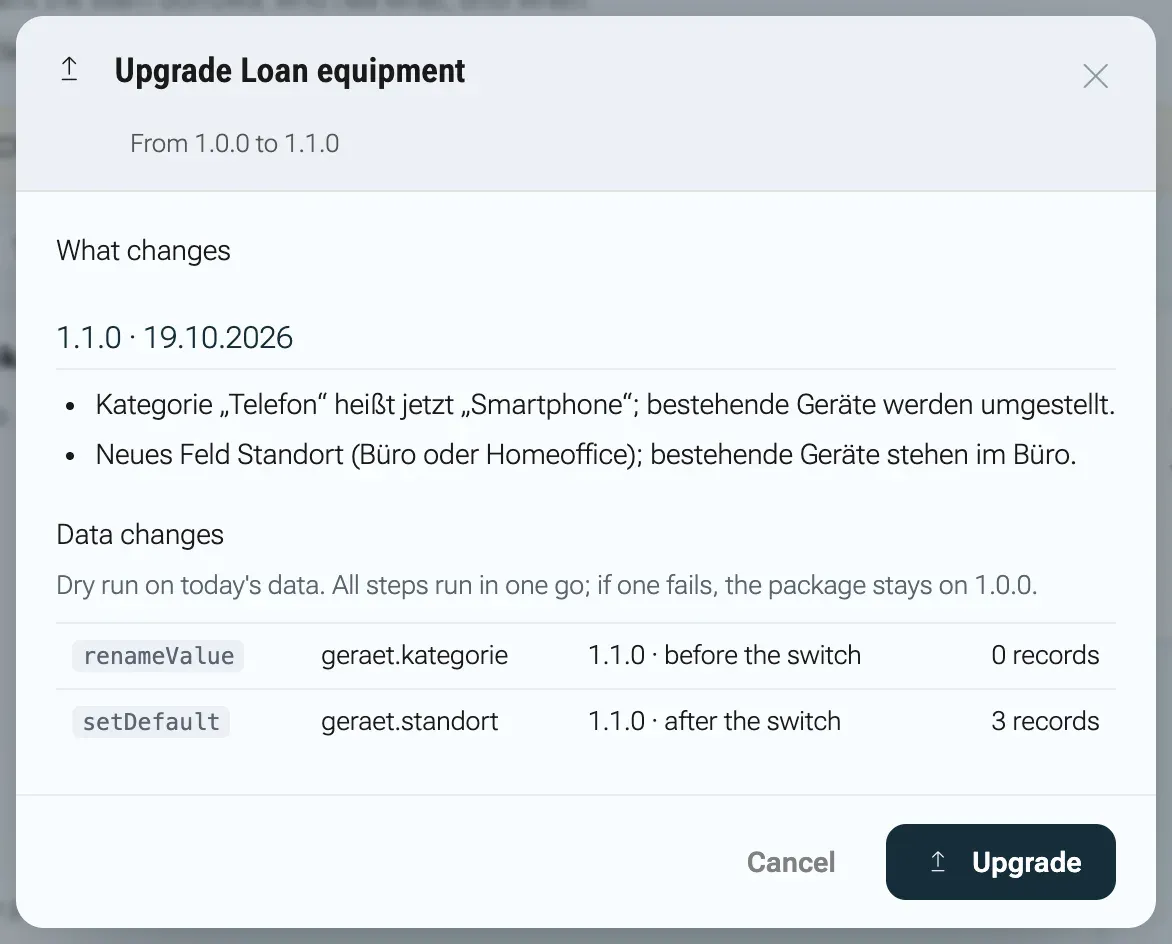
- Plan. The update dialog shows the result of the plan before anything changes: under What changes the changelog entries between the two versions, under Data changes one line per migration step with its phase (“before the switch” or “after the switch”) and how many records it would touch today (“1 record”, “9 records”). If the new version brings sample rows the tenant does not have yet, the dialog offers Create new sample data with their number, unticked. Refusals appear under “This upgrade is not possible:” and block the button.
- Consent. If the new version wants to use data or services the admin has not agreed to yet, they appear under New consent. Without a tick on every item the package stays on the old version.
- The transaction. nexxus runs all
presteps, switches the installation to the new version, runs allpoststeps, rewrites the lookup tables of every record under the new descriptors, records the steps in the ledger, creates new roles, extends the module’s own roles, rewrites the AI Assistant skill from the new instructions and installs new rows fromdata/, and with the box ticked the new rows fromdemo/. - After the commit. The platform announces the update to the module’s services.
If anything in step 3 fails, the whole transaction rolls back. The installation, the records and the roles stay exactly on the old version, and the dialog shows “Not upgraded:” followed by the server’s message, for example Die Migration auf 1.1.0 ist gescheitert, 'acme.leihgeraete' bleibt auf 1.0.0: <reason> (the migration failed, the package stays on 1.0.0).
Roles after an update
Section titled “Roles after an update”New roles in the manifest are created as new access roles. Roles the module created earlier get the permission keys that are new in this version (new entities, new extra permissions), and only when the manifest role already existed in the old version. Keys an admin removed from such a role stay removed. Roles the module does not own are never touched, so nobody gains rights through an update that an admin did not hand out.
Events your services receive
Section titled “Events your services receive”Module services subscribed to record events see every change a migration step makes: one event per record and step, sent in the update transaction. A record that two steps touch is sent twice. After those record events, every service of the installation receives installation.upgraded with the previousVersion, so it can fill in what it would have computed had it been there from the start. See Module services for the event bodies.
Deactivate, uninstall, install again
Section titled “Deactivate, uninstall, install again”An admin has three ways to take a module out of use. They differ in what remains:
| Action | Menu, pages, AI Assistant tools | Records | Roles | AI Assistant skill | Service account |
|---|---|---|---|---|---|
| Deactivate | gone for everyone | kept, invisible | kept | switched off | disabled |
| Uninstall with Keep the data | gone | kept, invisible | kept | removed | disabled |
| Uninstall with Delete the data | gone | soft-deleted | deleted with their assignments | removed | deleted with its role |
- Deactivate is a pause. Activate brings everything back as it was.
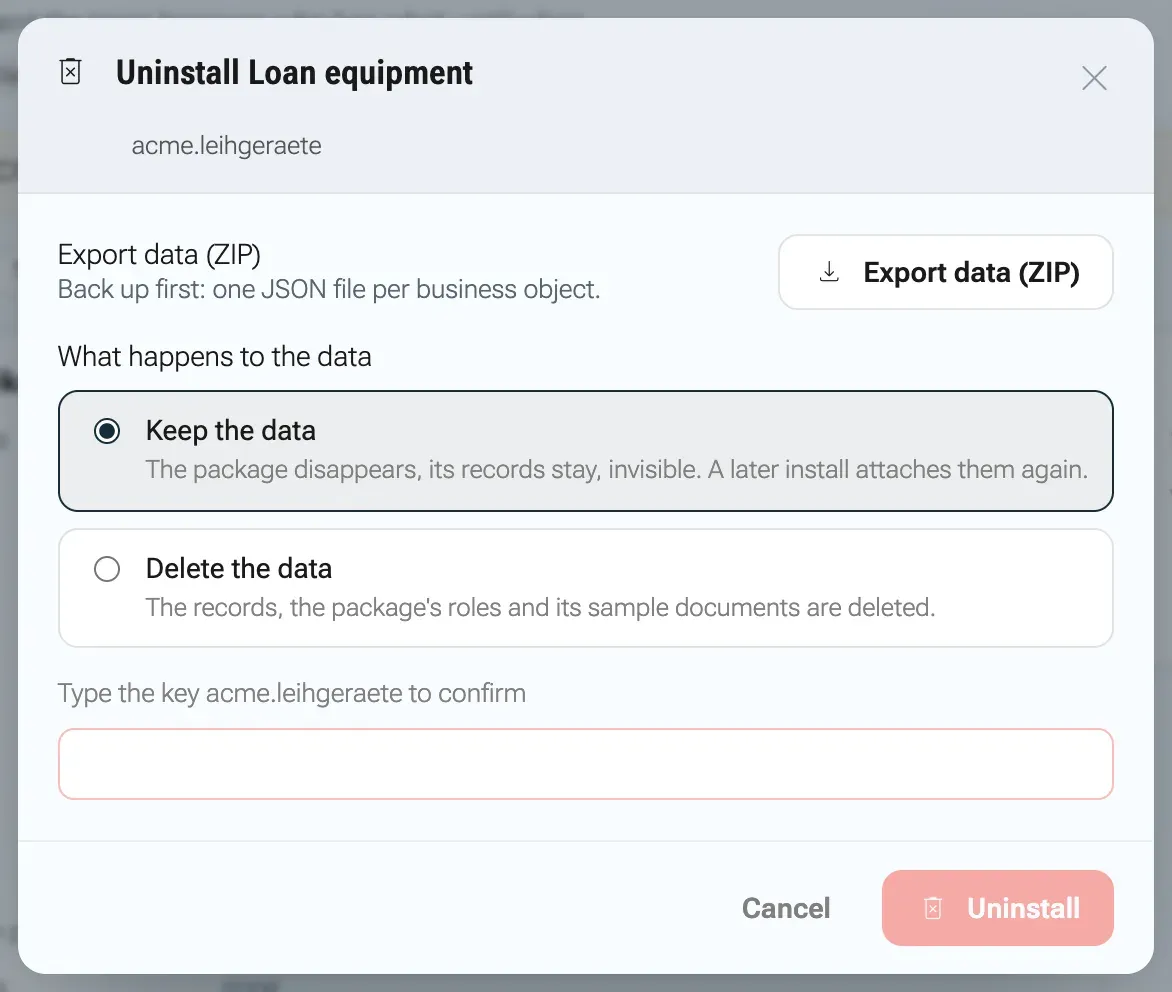
- Keep the data removes the module but leaves its records in place. The catalogue lists it as “Removed, data kept”, and the package page offers Install again. A new install reattaches the records and roles. If the admin installs a newer version than the retained one, the update steps between the two versions run as part of the install.
- Delete the data soft-deletes the records, removes the module’s roles with their permissions and assignments, moves its sample folder and documents in the files area to the deleted state and clears the migration ledger. Partners created by sample data stay, because other records of the tenant may refer to them by now.
Every package can be deactivated or uninstalled on its own: no other package builds on it.
Export before you uninstall
Section titled “Export before you uninstall”The uninstall dialog offers Export data (ZIP). The file <key>-export.zip contains one <entity>.json per entity of the installed version and a module.json with key, version and export time. Each record appears as:
{ "id": 12, "key": "d-0184-vollmacht", "data": { "titel": "Vollmacht Sabine Vogl", "typ": "vollmacht", "status": "geprueft" }, "version": 3, "createdAt": "2026-10-08T07:12:44Z", "updatedAt": "2026-10-08T09:30:02Z"}key is the data file key for records that came from package or sample data, and null for records people created.
Worked example: Loan equipment 1.0.0 to 1.1.0
Section titled “Worked example: Loan equipment 1.0.0 to 1.1.0”The tutorial package of Build your first module shows a complete update. Version 1.0.0 stores phones with the category value telefon. Version 1.1.0 renames that value to smartphone and adds the field standort (location) with the default buero (office). Its migrations block is exactly the one shown under Migration steps.
The sample data of 1.0.0 holds three devices, none of them a phone. On a tenant that installed 1.0.0 with that sample data and nothing else, the update dialog shows:
- under Data changes:
renameValueongeraet.kategorie, “1.1.0 · before the switch”, 0 records, andsetDefaultongeraet.standort, “1.1.0 · after the switch”, 3 records; - no section New consent, because 1.1.0 asks for no new data access;
- no refusals: no field disappears, no type changes, and the new field has a default.
Had standort been required without a default, the dialog would refuse with „Das neue Pflichtfeld ‘geraet.standort’ hat keinen Standardwert.“ (the new required field has no default).
When something goes wrong
Section titled “When something goes wrong”These messages come from the server and are German in every language of the app.
| Message | What it means and what to do |
|---|---|
| „Version 1.1.0 ist nicht neuer als die installierte 1.1.0.“ | You picked the installed version. Upload a higher version number. |
| „Das Feld ‘frist.ereignis’ fehlt, das geht nur mit einer neuen Hauptversion.“ | A field was dropped in a minor version. Keep the field, or release a new major version with a deleteField step. |
| „Das neue Pflichtfeld ‘frist.quelle’ hat keinen Standardwert.“ | Give the new required field a default, or make it optional and fill it with a setDefault post step. |
Zustimmung fehlt für: <items> | The update request did not include every new consent item. Tick every item under New consent. |
Die Migration auf 1.1.0 ist gescheitert, 'acme.leihgeraete' bleibt auf 1.0.0: <reason> | A step failed and everything was rolled back. The reason at the end names the problem; fix the step in a new version. |
| „‘acme.leihgeraete’ ist schon installiert (Version 1.0.0); für eine neue Version gibt es das Upgrade.“ | The package is installed. Use the upgrade button on the package page instead of installing again. |
| „‘acme.leihgeraete’ ist deinstalliert; eine neue Installation hängt die Daten wieder an.“ | The module was uninstalled with its data kept. Use Install again. |