How one NXM package turns nexxus into software for a law firm. Case files, parties, documents with notes, drafts that the AI Assistant writes and a lawyer approves, and a deadline control with a module service that computes deadlines by German procedural law.
For
AdminsBuildersDevelopers
Time
12 min
CuriaOS is legal-practice software for German law firms. Its business module exists as one NXM package, “Law firm”, with the key curiaos.kanzlei. It was built from CuriaOS’s own screen designs and runs on nexxus like any other package: uploaded as an .nxm file and installed per tenant. It uses entities, every kind of view, actions with a four-eyes rule, roles, a module service, installation settings, sample data and instructions for the AI Assistant, which makes it a good reference for what a complete package looks like.
Legal services
Case files and deadline control for a law firm
Starting point
A firm's work hangs on case files and deadlines. A missed statutory deadline can cost the client the case, letters must not leave the office before a lawyer has read them, and the assistant has to know the file it is talking about.
What they built
One NXM package, Law firm. It holds case files, parties, documents with notes and drafts, and a deadline control with four-eyes completion and a module service that computes deadlines and proposes new ones from incoming court letters.
What changed
Everything runs inside nexxus, under its rights model and with the AI Assistant. The AI Assistant writes drafts as records that a lawyer approves. Computed deadlines name their legal basis, and a proposal from a document counts only after a person confirms it.
Case files, parties, case documents with notes, drafts, deadlines and the deadline service. This page describes mostly this part.
released
1.1.0
Client intake: intake review with the capacity per area of law, conflict check, accepting or declining, an intake form the client fills in without an account, and “Akte anlegen” (create case file) from it
released
1.1.1
Fixes to capacity, conflict check and intake form, partly from a test on CuriaOS
in preparation
1.2.0
Sending by e-mail with the letter as a PDF, posting by mail, a dispatch log and search through references; needs nexxus 0.3.0
in preparation
What each version changes in detail is in the package’s CHANGELOG.md. The package has a repository of its own with one folder for the current version. Every released version is a git tag curiaos.kanzlei-v<version>, from which CI builds the signed archive (see Package a version).
Until 9 October 2026 the same content came as two packages, Case files & parties (curiaos.akten) and Deadlines & follow-ups (curiaos.fristen), the second building on the first. nexxus no longer lets a package build on another one, so what belongs together ships as one package. Package structure explains the rule.
From version 1.1.0 the package has an area of its own in the menu, “Kanzlei”, with the sections intake, case files and deadlines. Version 1.0.0 used the area projekte, so it appeared as one section under Organisation. There the area only places the section: a tenant who switches the business area off in the setup step Areas still has the package; only deactivating or uninstalling it takes it away.
Number 2026/0184 from a sequence field, subject, client and opponent (both partners of nexxus), area of law, two status fields (status for where the work stands, phase for the stage of proceedings), responsible lawyer, location, value in dispute, legal-expenses cover, facts and assessment, and the readonly “Next deadline (computed)”
beteiligung
Party
A partner’s role in one case file, with the references that belong to that role there: court file number, policy number, claim number, deductible
aktendokument
Case document
A PDF from the files area attached to a case file, with type, date received, sender and a checked flag
notiz
Note
A note on a marked passage of a document: page, quote, category
entwurf
Draft
A letter the AI Assistant drafts and a person approves or discards
Clients, opponents, insurers and courts are ordinary partners of nexxus. The package does not copy their master data: a party links a partner to a case file and holds only what belongs to that role in that file. A partner’s own page gets the tab “Case involvement” from a declarative related view, without a line of HTML.
One more entity, frist (Deadline), with four types: Notfrist (a statutory deadline that cannot be extended), Frist, Vorfrist (an early warning before a main deadline) and Wiedervorlage (a follow-up). Each deadline belongs to a case file of the same package. Besides the fields people fill in, a deadline records where it came from (entered by hand, computed, found in a document), the rule it was computed with, the basis of the computation, the source document and the passage in it.
Menu entries: “Case files”, “Deadline calendar” (a custom page with list and month view, grouped into “Urgent & overdue”, “Upcoming” and “Done”), “Deadlines”, “Case documents”, “Drafts” and “Parties”. Extra permissions: zuweisen (“Assign case files”) and freigeben (“Approve drafts”). Scopes: core:partner:read, core:user:read, core:dmsDocument:read.
Role
Reads
Writes
Firm management
everything
everything, may assign case files and approve drafts
Responsible lawyer
everything
everything, may approve drafts
Office & deadline control
everything
case files, parties, case documents and deadlines
Read only
everything
nothing
In most German firms the office staff keep the deadline book, under the lawyers’ supervision. That is why deadline control sits with the office role and not in a role of its own: on its own, such a role could change deadlines without being able to read the case file they belong to. Every role that writes deadlines can complete them, but only with a second person as checker (see below).
Who works with it
Lawyers and office staffLists, cockpits, dialogs and the deadline calendar
AI AssistantAnswers with the case file, writes drafts as records
Incoming documentsPDFs from the files area, attached to a case file
nexxus
Records, rights and views of the package
Case files
Deadlines
Roles
Partners
Module service
Deadline serviceComputes deadlines and early warnings, reads PDFs, writes back through the record API
The service runs outside the platform. It receives events and calls back with a short-lived token, under the scopes the admin agreed to.
CuriaOS described its product as screens. Each screen became a view in one of the slots nexxus offers. Declarative views cost nothing to build; custom views are HTML files on the view SDK; the two dialogs marked with the service need the deadline service.
Screen in the designs
View
Slot
Case file list
akte.list
list (declarative)
Assign from the list
akte.zuweisen, action zuweisen
record.action
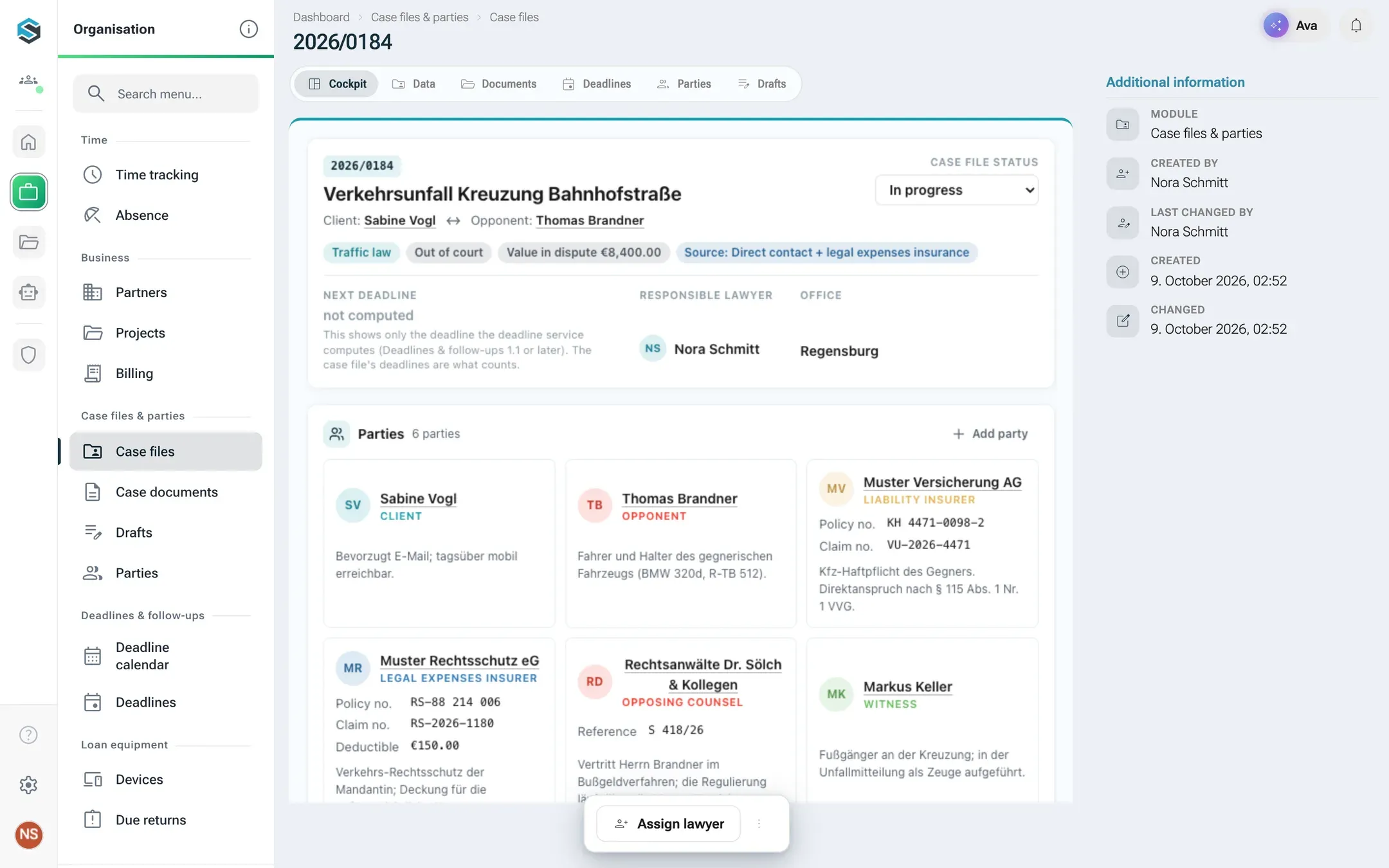
Case cockpit
akte.cockpit
record.detail on the case file
Data, costs, facts of a case
akte.record, “Data” tab with related parties and drafts
record (declarative)
Documents of a case
akte.dokumente
record.tab on the case file
Document library
aktendokument.list
list (declarative)
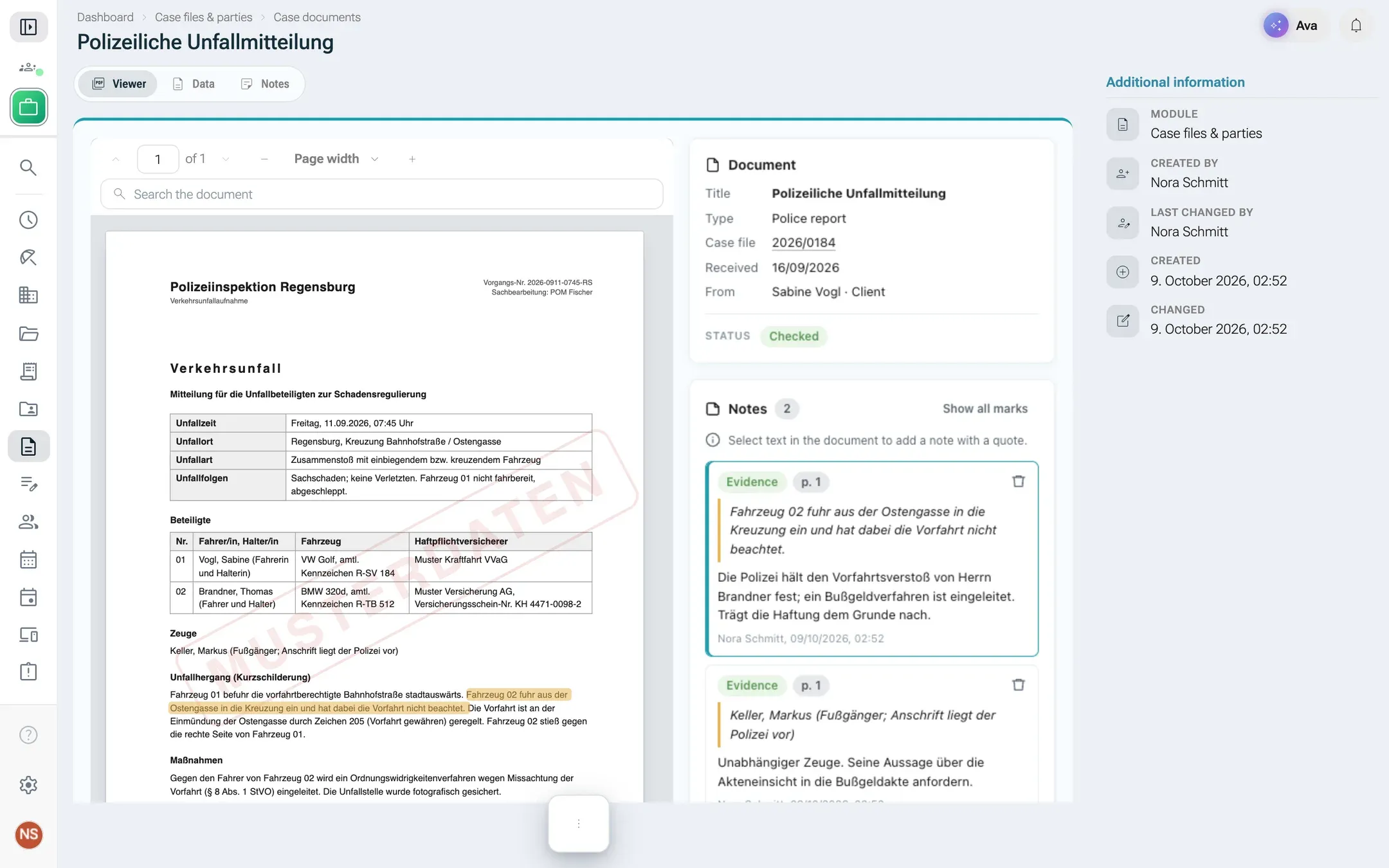
Document detail
aktendokument.ansicht, the PDF viewer of nexxus with notes
record.detail
Lawyer cockpit: my cases, approvals, deadlines
meine-mandate, freigaben, fristen-woche
dashboard.widget
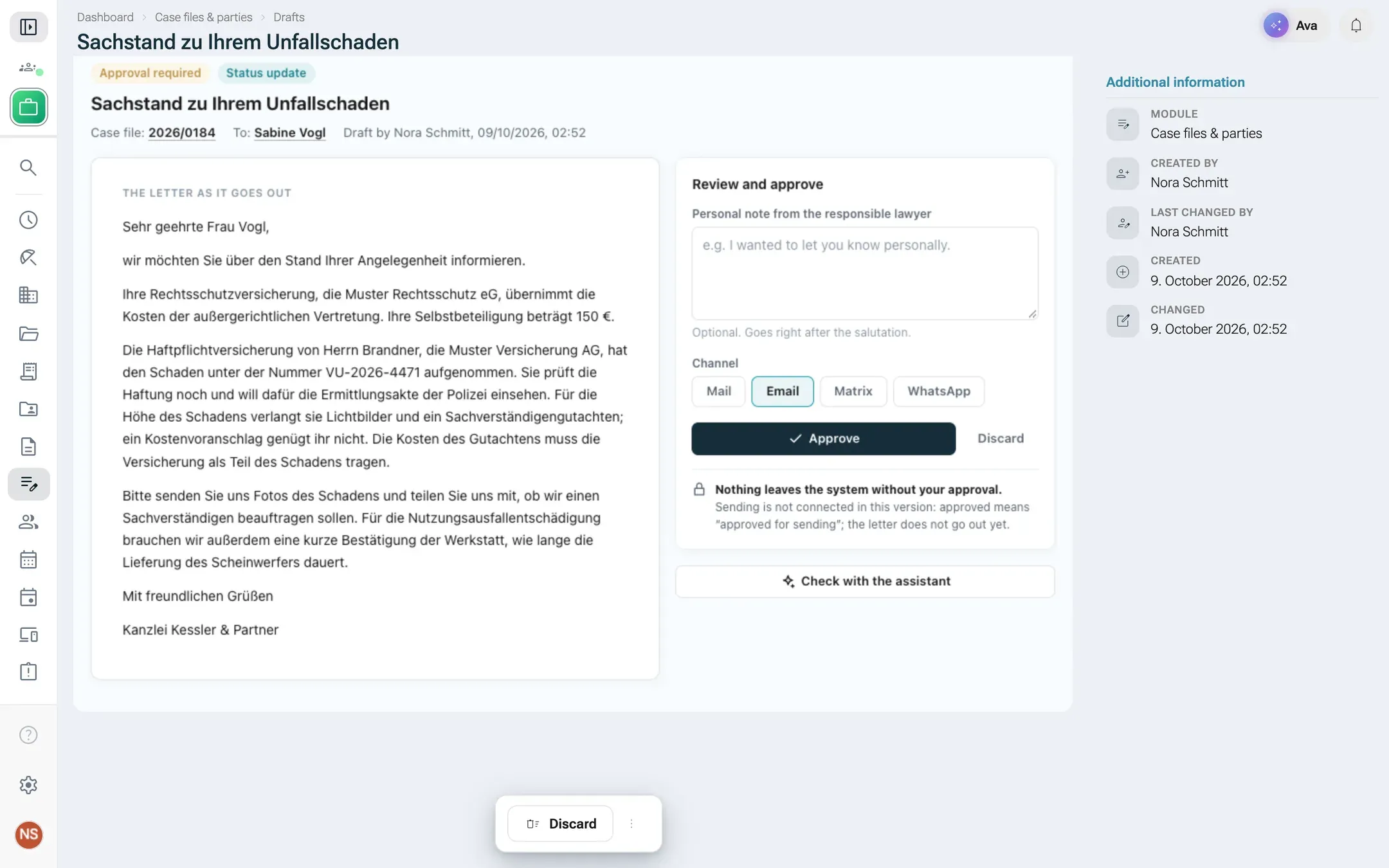
Review and send a draft
entwurf.pruefen
record.detail on the draft
Deadline calendar
fristenkalender
page
Confirm a deadline as done
frist.erledigen
record.action on the deadline
Compute a deadline
fristberechnung
record.action on the case file, with the service
Proposal from a document
frist.vorschlag
record.detail on the deadline, with the service
Deadlines and appointments of a case
akte.fristen
record.tab on the case file
Contacts and parties
the nexxus partner page with “Case involvement”
related tab on core:partner
The assistant rail of every screen
The AI Assistant, with example prompts per view
the shell
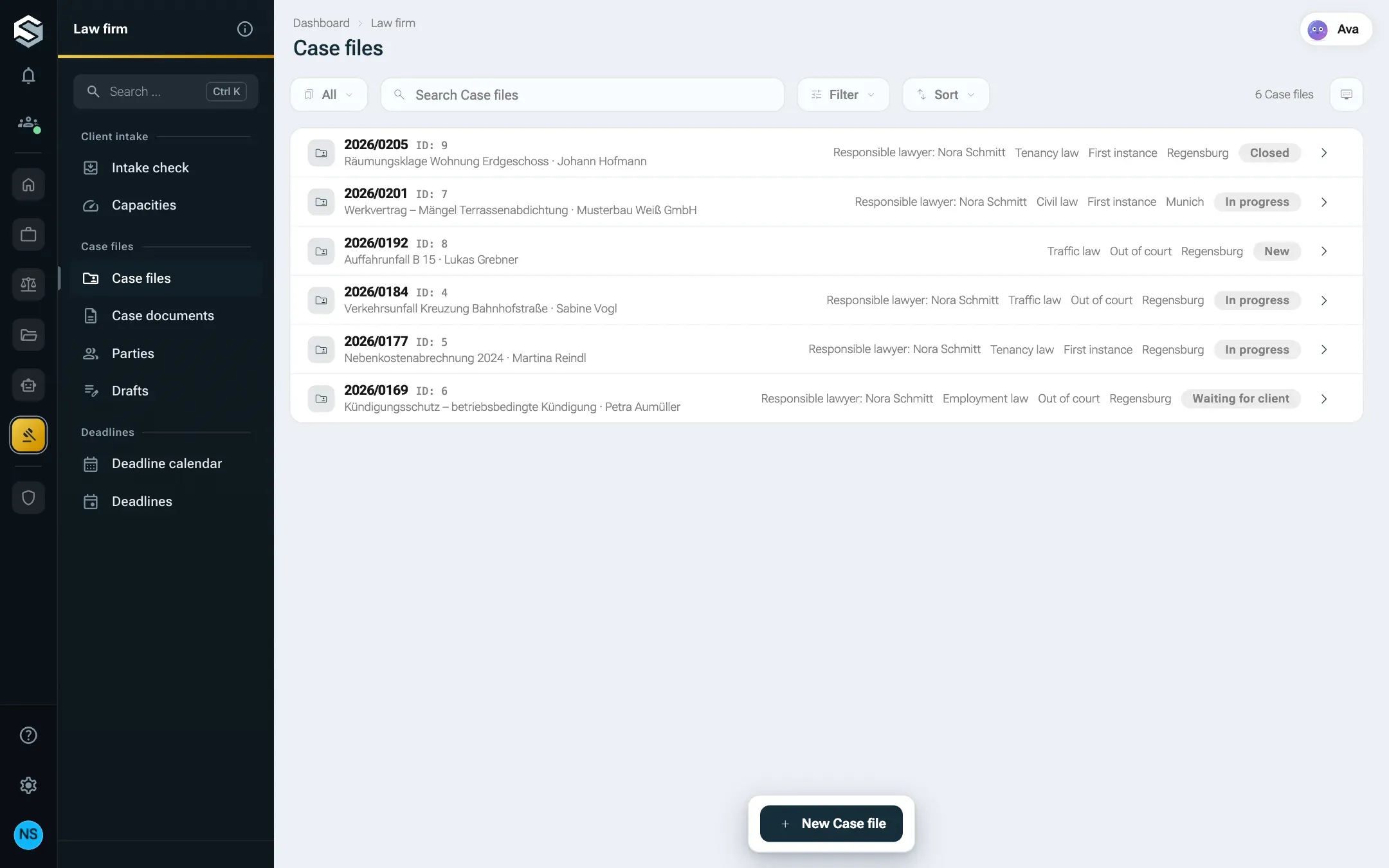
/x/curiaos.kanzlei/akte
A declarative list view, built from the manifest alone.
/x/curiaos.kanzlei/akte/1/ansicht/akte.cockpit
Custom detail views come first, then Data, then the module's tabs, then related lists.
The document view shows how a custom view uses a component of nexxus: it reserves an area with nx.pdf.mount, nexxus lays its own PDF viewer over it and loads the document with the rights of the person reading. A selected passage becomes a note with page and quote; clicking a note jumps to the page and highlights the quote. The bytes of the PDF never pass through the view.
A law firm cannot let an AI send letters. The package therefore gives the AI Assistant exactly one way to write a letter: as a record of the entity entwurf with the status “Awaiting approval”. The package’s instructions, installed as a tenant skill, tell the AI Assistant to draft letters only that way, never to claim anything was sent, to name the documents a statement rests on, and to leave deadline arithmetic to the deadline service. On the cockpit, the AI Assistant offers the example prompts “Draft a coverage request”, “Summarise the facts from the documents” and “Which documents are still missing?”; on the review page, “Check the draft against the file”.
A lawyer opens the draft and reviews it in the view “Review”. The action “Approve” needs the extra permission freigeben, records who approved and when, and is deliberately not an AI tool, so only people approve. Up to version 1.1.1 its confirmation reads “Approve this draft? It then counts as approved for sending. This version has no way to send it yet.” The review page says it plainly: “Nothing leaves the system without your approval.”
Version 1.2.0 adds the way to send and turns it into two steps with two permissions. “Approve” records the approved state: subject, text, recipient, channel and the letter text as the preview shows it. “Send by e-mail” needs the permission versenden and is an action of type mail: nexxus shows recipient, address, subject and attachment in its own dialog, renders the letter as a PDF from the package’s template, files it under Kanzlei › Schriftverkehr › case number in the files area and writes every dispatch to a log nobody can edit. Only the approved state is sent. If someone changes the draft afterwards, the review page offers to approve it again. The AI Assistant has no tool for either step and calls a letter “sent” only when the log shows it. Package structure explains how such an action is built.
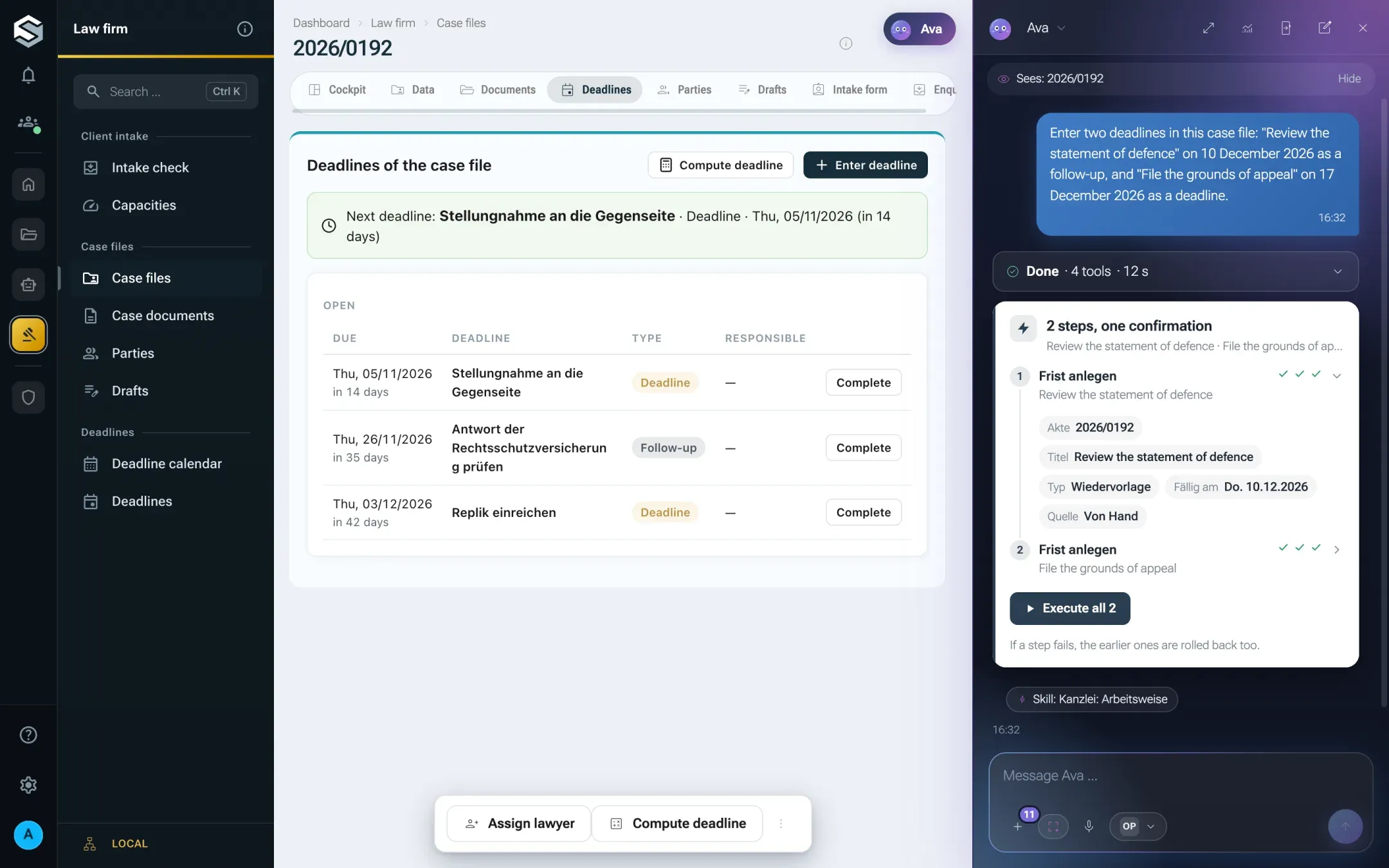
Everything the AI Assistant writes goes through the action card of nexxus. When a lawyer asks the AI Assistant to enter two deadlines in case file 2026/0192, it proposes the package’s action curiaos.kanzlei:frist.create twice, the server checks both, and the chat shows one card for them: each step with a green tick for each of the three checks (input, state, permission) and its values one click away, and one button Execute all 2. Nothing changes before that click, and if one step fails, the other is rolled back. Action names come from the package and stay German. The page follows at once: the deadlines tab of the case file shows the new entries without a reload.
/x/curiaos.kanzlei/akte/5/ansicht/akte.fristen
Several changes of a package, one card, one click.
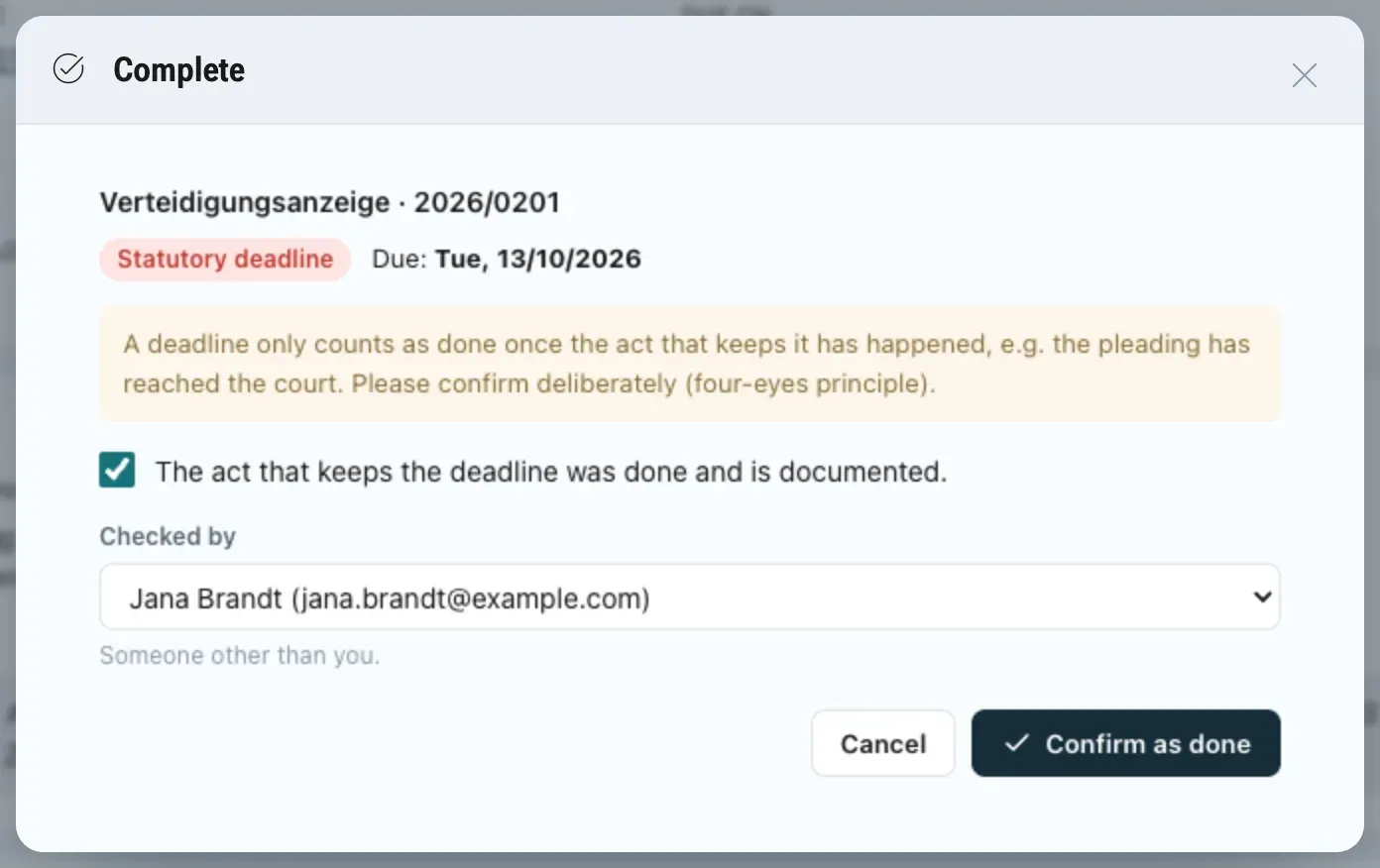
A deadline counts as done only when the act that keeps it really happened. The package makes this a rule the server enforces, not a habit:
status, erledigt_von, geprueft_von and erledigt_am are readonly, so no form can set them.
Only the action erledigen (“Complete”) sets them. It writes the acting person and the time, and takes the checker from the dialog.
The action carries "distinct": ["geprueft_von", "$user"]. If the checker is the person completing the deadline, the server refuses with „Geprüft von“ muss eine andere Person sein als die, die die Aktion ausführt. (“Checked by” must be someone other than the person running the action).
The dialog asks for the box “The act that keeps the deadline was done and is documented.” and a second person under “Checked by”, then “Confirm as done”.
The checker must be another person; the server checks it.
Moving a deadline uses a when condition: the action “Move” is offered only for the types Frist, Vorfrist and Wiedervorlage, so a statutory deadline cannot be moved, and its confirmation explains why: “Deadlines do not move by themselves: only after a granted extension (§ 224 (2) ZPO) or for own early warnings and follow-ups.”
The package brings a module service, “Deadline service” (Fristendienst). It runs outside nexxus, holds no credentials and works only with the scopes the admin agreed to; the admin also agrees to the service and its host in the install dialog. It does four things:
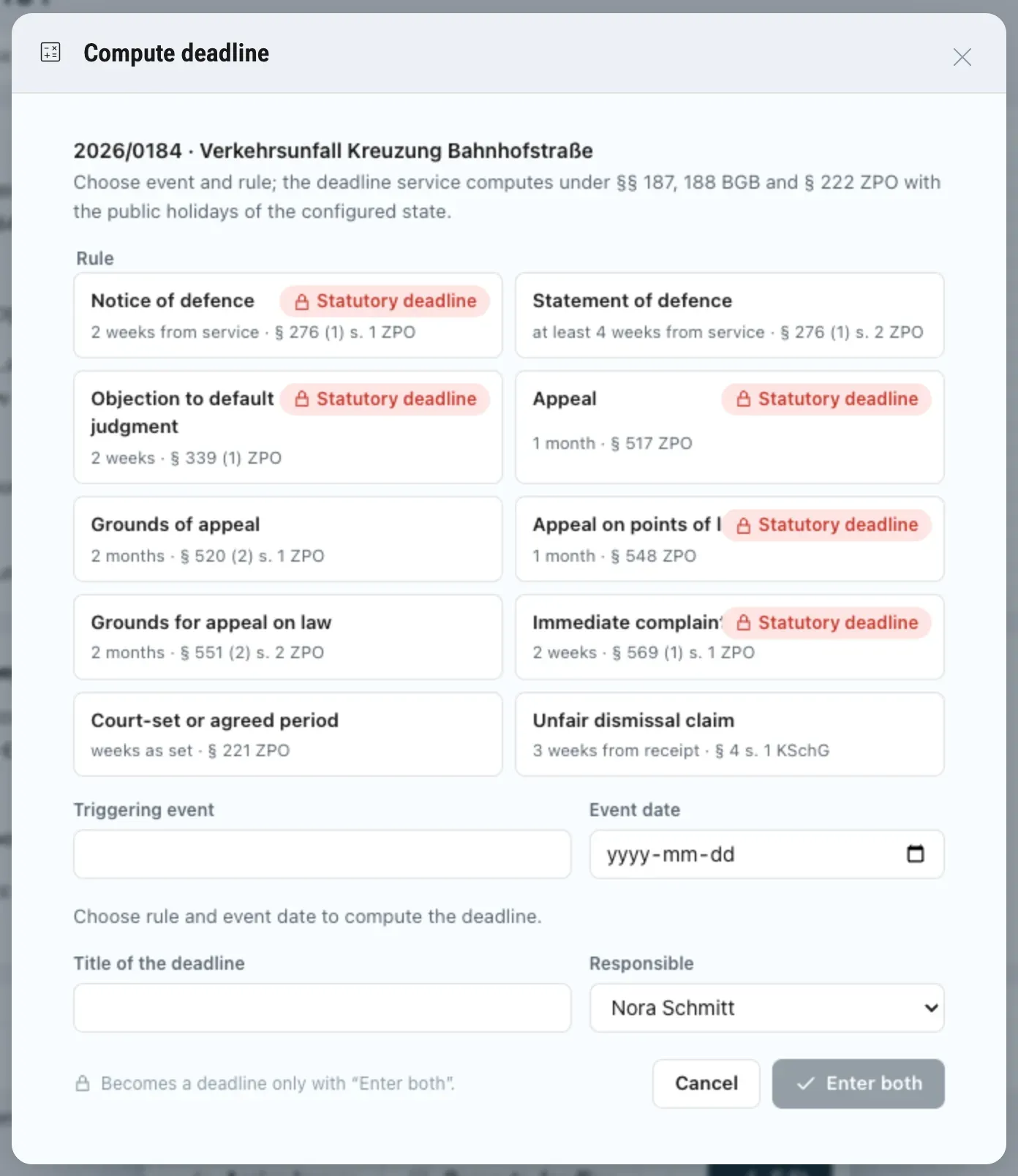
Computes deadlines. The dialog “Compute deadline” on a case file sends an event, its date and a rule to the operation berechnen. The service answers with the end date, the early warning and the basis of the computation. “Enter both” creates the main deadline and its early warning through the operation eintragen. Entering the same deadline twice returns the existing pair.
Adds early warnings. Every open statutory deadline or Frist gets an early warning the number of working days before it that the setting “Early warning (working days before the deadline)” names (default 3).
Keeps “Next deadline (computed)” current on every case file: the earliest open statutory deadline or Frist. Early warnings and follow-ups do not count.
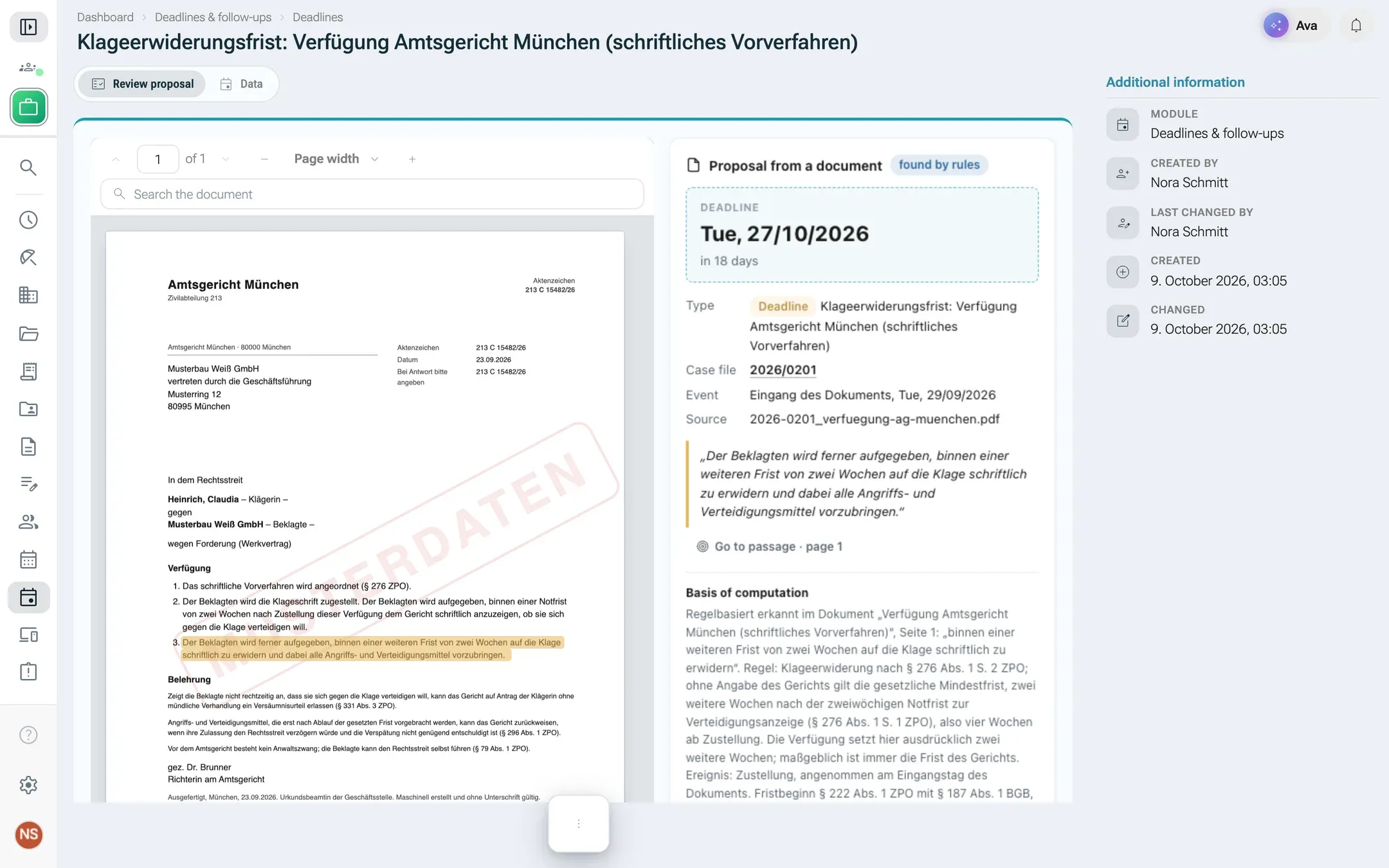
Proposes deadlines from documents. When a case document arrives, the service reads its PDF, finds deadline sentences such as “binnen zwei Wochen” or “bis zum 31.10.2026”, takes the event date from “zugestellt am” in the text or the document’s date received, and creates a deadline with the status “Proposal”. A proposal binds nobody: a person opens the view “Review proposal”, sees the sentence highlighted in the PDF next to the computed deadline, and chooses “Confirm proposal” or “Reject proposal”. If the case file already has an open deadline of the same kind, the proposal is still made and its basis starts with a warning about a possible duplicate.
The detection is rule-based, and every proposal says so in its basis. Each rule names its legal provision:
Rule key
Label in the service
Period
Basis
Court-set weeks
verteidigungsanzeige
Frist zur Verteidigungsanzeige
2 weeks, Notfrist
§ 276 Abs. 1 S. 1 ZPO
no
klageerwiderung
Klageerwiderungsfrist
4 weeks (statutory minimum 2 + at least 2 further)
§ 276 Abs. 1 S. 2 ZPO
yes
berufung
Berufungsfrist
1 month, Notfrist
§ 517 ZPO
no
berufungsbegruendung
Berufungsbegründungsfrist
2 months
§ 520 Abs. 2 S. 1 ZPO
no
revision
Revisionsfrist
1 month, Notfrist
§ 548 ZPO
no
revisionsbegruendung
Revisionsbegründungsfrist
2 months
§ 551 Abs. 2 S. 2 und 3 ZPO
no
einspruch
Einspruchsfrist gegen Versäumnisurteil
2 weeks, Notfrist
§ 339 Abs. 1 ZPO
no
sofortige-beschwerde
Frist für die sofortige Beschwerde
2 weeks, Notfrist
§ 569 Abs. 1 S. 1 und 2 ZPO
no
kuendigungsschutzklage
Klagefrist Kündigungsschutzklage
3 weeks
§ 4 S. 1 KSchG (end moved by § 193 BGB)
no
richterliche-frist
Richterliche Frist
as set by the court
§ 221 ZPO
required
The counting follows §§ 187, 188 BGB: the day of the event is not counted, weeks and months end on the day with the same name or number, or on the last day of a shorter month. An end on a Saturday, Sunday or public holiday moves to the next working day (§ 222 Abs. 2 ZPO, § 193 BGB), with the statewide holidays of the setting “State for public holidays” (default Bavaria). Example: service on 15.07.2026 plus one month for an appeal (§ 517 ZPO) ends on Saturday 15.08.2026 and moves to Monday 17.08.2026. Holidays that apply only in part of a state are left out on purpose, so a computed end can be early, never late.
Pick a rule and the event date; the deadline service computes end, early warning and basis.
A proposal counts only after a person confirms it.
After the install, and again after every update and activation, the service goes through all case files once: it adds the early warnings that are missing and fills in “Next deadline (computed)”. The two settings “State for public holidays” and “Early warning (working days before the deadline)” are edited on the package page under Settings.
While the service cannot be reached, deadlines can still be entered by hand, but the dialog “Compute deadline” shows an error instead of a result. Events wait meanwhile: nexxus retries each delivery with growing pauses, up to eight attempts.
Module services explains how such a service receives events and calls back.
The package brings sample data (“Musterdaten”) that the admin can choose at install with Create sample data. Everything is invented: a fictitious firm „Kanzlei Kessler & Partner“, six case files across traffic, tenancy, employment and civil law in four statuses, 18 parties, seven PDFs, six notes, three drafts (two waiting for approval, one approved), nine deadlines and one proposal from a court letter. Every PDF page carries a “MUSTERDATEN” stamp.
All dates are relative to the day of the installation ({"$date": "+2wd"}), so the sample firm looks the same whenever you install it: one deadline is overdue, one is due today and a statutory deadline lies two working days ahead. Working-day steps keep every deadline on a weekday. The rows refer only to rows of the same package ({"$key": "akte:2026-0184"}), so the sample data installs on a tenant that has nothing else installed.
The deadline service sees the sample data like any other new record. Of the seven PDFs, only the court letter in case file 2026/0201 contains deadline sentences, two of them. The sample data already holds both: the statutory deadline for the notice of defence as a proposal someone confirmed, and the statement of defence as an open proposal. The service therefore proposes nothing twice.
Where the screen designs and German law disagreed, the package follows the law:
Deadline arithmetic happens in the service, never in a view. The views show what the service computed, with its basis.
A coverage request goes to the client’s legal-expenses insurer. A claim from a traffic accident goes to the opponent’s liability insurer (direct claim, § 115 Abs. 1 Nr. 1 VVG). The AI Assistant’s instructions say so.
The action period of § 4 KSchG is no Notfrist in the sense of § 224 Abs. 1 S. 2 ZPO. It is entered as a Frist with the note “nicht verlängerbar; nachträgliche Zulassung nur nach § 5 KSchG”.
A deadline the firm set for the other side is a follow-up for the firm, not a deadline of its own.
The defence after § 276 Abs. 1 S. 2 ZPO gets at least two further weeks set by the court. The service computes four weeks from service as the statutory minimum and takes a court-set duration as wochen.
A statutory deadline counts as urgent seven days ahead, other deadlines three, because a Notfrist cannot be extended.