
Modules (NXM)
Views and the view SDK
How an NXM module shows its records. Declarative views that nexxus draws for you, custom HTML views in a sandbox, and the view SDK that connects them to the platform.
An NXM module has two ways to put something on screen. Most screens need no code at all: you describe a list or a record page in module.json, and nexxus draws it with the same components as its built-in modules. When a screen needs its own layout, such as a calendar, a cockpit with several blocks or a PDF with notes beside it, you write one HTML file. nexxus runs that file in a sandboxed frame and hands it a small JavaScript API, the view SDK (window.nx).
This page covers both. Start with the declarative views and reach for a custom view only where they stop being enough.
Two tiers of views
Section titled “Two tiers of views”| Declarative views | Custom views | |
|---|---|---|
| Written as | JSON in module.json (type: list, record, related) | One HTML file per view (type: "custom", html: "ui/<name>.html") |
| Drawn by | nexxus itself | Your HTML, in a sandboxed frame |
| Looks like | The rest of nexxus, automatically | nexxus when you use the UI kit and theme tokens |
| Data access | Built in: lists, filters, forms, related lists | Through window.nx, as the person looking at the view |
| Good for | Lists, record forms, lists of related records | Pages, cockpits, calendars, dialogs, PDF review |
Both tiers act with the rights of the person on the page. A custom view never gets more access than the person who opened it, and every call it makes is checked again on the server.
Your view
One HTML file with inline script and style, running in a sandboxed frame.
The view SDK
window.nx sends each request over a private message channel.
The host in nexxus
Adds the module and the session, shows toasts, dialogs and the PDF viewer.
The platform API
Checks the rights of the viewing person and answers.
Declarative views
Section titled “Declarative views”These four types need no HTML. nexxus builds lists, forms, tabs and maps from them.
list: the list page of an entity at/x/<module>/<entity>. You choosecolumns(a field key, or{ "field": "status", "display": "badge" }),filtersand a defaultsort;"create": trueshows the button for a new record. Filters and sorting work on indexed fields only. Without a list view, nexxus builds one from thetitleFieldand the first four indexed fields. The list shows each record as a row in nexxus’ list style, and every column stays visible: thetitleFieldbecomes the heading, references and text fields go below it, the first person (core:user) with its label beside them. Choices, dates and numbers sit on the right, the first amount highlighted, and the badge columnstatus(else the first badge column) as a chip. Under View options each person picks the density Normal or Compact and saves views of their own.record: the Data tab of a record.sectionsgroup the fields,relatedadds lists of records that point to this one, andactionsdecides which actions the action bar offers.related: a tab on another entity’s page that lists records pointing to it. On a core record that is the partner, project, invoice or opportunity page ("target": "core:partner","core:project","core:invoice"or"core:opportunity", slotrecord.tab).map: the records of an entity on a map, together with their list, as a page of the module at/x/<module>/p/<view>.geoFieldnames thegeofield that places a record.
The full field reference for these views is on Package structure.
How a record page is put together
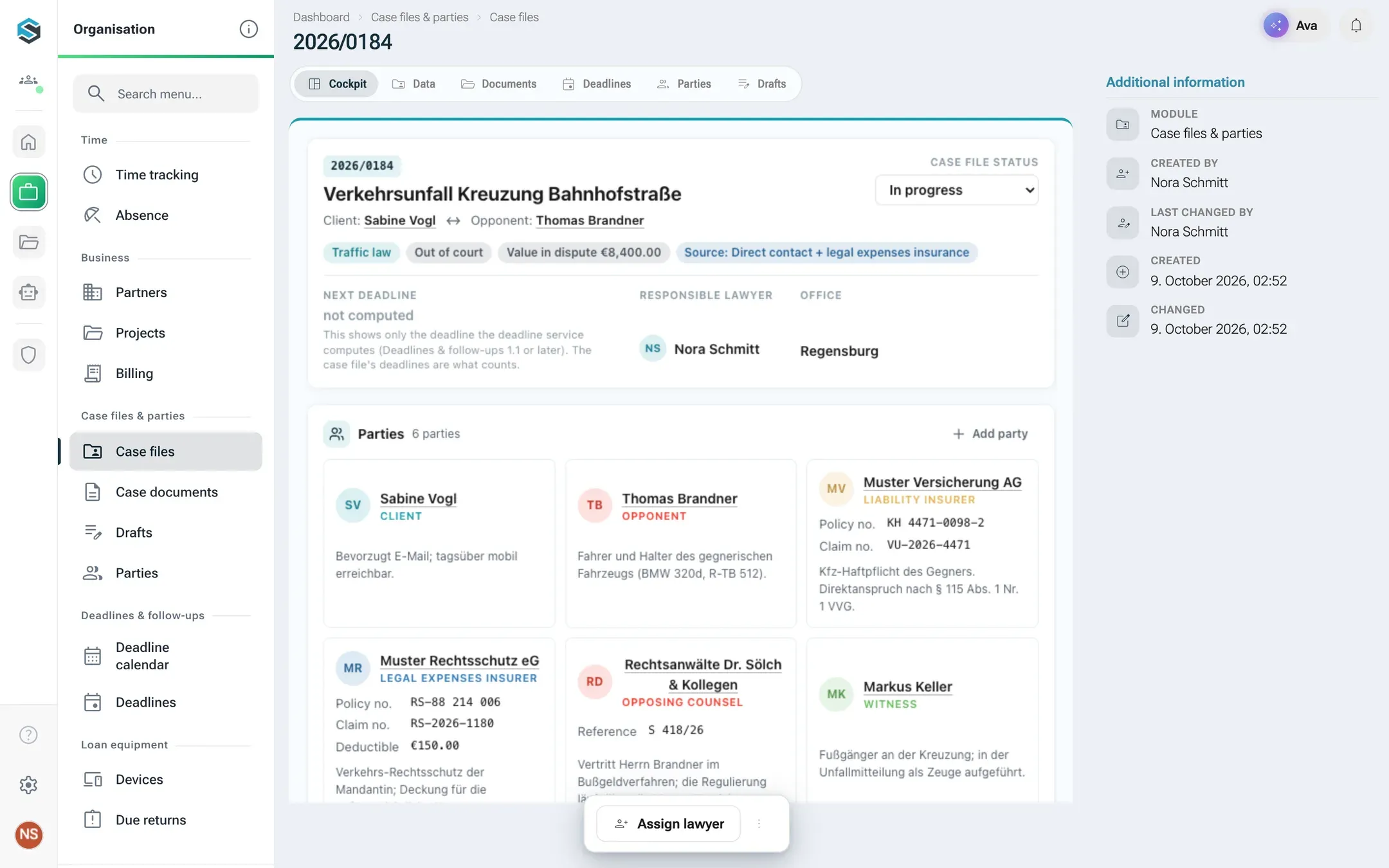
Section titled “How a record page is put together”A record page of a package entity shows its tabs in this order:
- every
record.detailview (custom views about this record), - the Data tab (the
recordview, or all fields if there is none), - every
record.tabview of the module, - the related lists.
Only views of the entity’s own package appear there: packages do not build on each other, so no other package adds tabs or dialogs to the page. Actions sit in the action bar at the bottom of the tab.
Slots: where a custom view appears
Section titled “Slots: where a custom view appears”A custom view declares a slot. The slot decides where nexxus shows it and what the view gets as context.
| Slot | Shown in the catalogue as | Where it appears | target |
|---|---|---|---|
page | Page | A page of its own at /x/<module>/p/<view>. It fills the area and can be a menu entry. | none |
record.detail | View on a record | The first tabs of a record page | an entity of the package |
record.tab | Tab on a record | A tab after Data; with a core target a tab on the partner, project, invoice or opportunity page | an entity, or core:partner, core:project, core:invoice, core:opportunity |
record.action | Dialog on a record | A dialog opened from the record’s action bar | an entity |
dashboard.widget | Dashboard tile | A tile with size s, m or l | none |
member | Client area page | A page of the customer area on the portal domain, at /konto/<view>, filling the window | none |
nexxus shows the title above a page and a record view: the view’s label on a page, the record’s title on a record page. The view does not repeat it and starts with what it adds, such as a period, a count or filters. A tile and a dialog get their title bar from nexxus too.
A tile reaches the start page in two ways: a person adds it with Customize and Add widget, where the view’s label, icon and module name are listed, or applies a template of the package (see Start page templates). None appears by itself. When the module is deactivated or removed, a placed tile says Module not available and comes back with the module.
{ "key": "faellig", "type": "custom", "slot": "page", "html": "ui/faellig.html", "label": { "de": "Fällige Rückgaben", "en": "Due returns" } }Showing a view only when it applies
Section titled “Showing a view only when it applies”Views and actions take an optional when. nexxus hides the view when the condition does not hold for the current record, and the server checks it again before an action runs.
"when": { "field": "status", "in": ["verfuegbar"] }"when": { "field": "dokument", "set": true }in holds when the field’s value is one of the listed values (for a list field, when any element is). set: true holds when the field has a value, set: false when it is empty.
The sandbox
Section titled “The sandbox”Every custom view runs in an <iframe> with sandbox="allow-scripts allow-forms" and without same origin, under the same content policy as apps:
default-src 'none'; script-src 'unsafe-inline'; style-src 'unsafe-inline';img-src data: blob:; font-src data:; media-src data: blob:; form-action 'none'; base-uri 'none'The sandbox exists because a package’s code does not come from nexxus. Whatever the view does, it cannot reach the network, read the session or touch the page around it. In practice:
- Inline only. Scripts, styles, fonts and images are inline or
data:/blob:URLs.fetch, XHR, WebSockets and<script src>from the network are blocked. - No cookies and no
localStorage. The frame has no origin. Usenx.storagefor what a person should find again. - Forms work, submissions don’t. A
<form>fires itssubmitevent, butform-action 'none'blocks anything that would navigate. CallpreventDefault()and handle the data yourself. - No popups and no downloads.
- No icon font. The Material Symbols font of nexxus is not available in the frame. Use inline SVG.
- Text as text. Records contain what people typed. Insert it with
textContent, never withinnerHTML.
The SDK and the UI kit are inserted before your own code, so window.nx exists when your first script runs. An HTML file may be up to 2 MB.
A minimal view
Section titled “A minimal view”This page lists the devices that are on loan, from the first module tutorial:
<!doctype html><html><head> <meta charset="utf-8"> <style>body { padding: 16px; }</style></head><body> <div class="nx-list" id="list"></div> <script> (async () => { const ctx = await nx.ready(); const {items} = await nx.records.search('geraet', { filter: {status: ['verliehen']}, sort: 'rueckgabe_am', size: 50, }); for (const geraet of items) { const item = document.createElement('button'); item.className = 'nx-list__item'; item.textContent = geraet.title; item.onclick = () => nx.nav.open({entity: 'geraet', id: geraet.id}); document.getElementById('list').append(item); } })(); </script></body></html>Context and events
Section titled “Context and events”await nx.ready() resolves once the host has connected. It returns the context of the view:
| Field | Meaning |
|---|---|
sdk | Protocol version, currently 1 |
module, version, view, slot | Where the view runs |
locale | de, en or pl, the person’s language |
theme | light or dark |
user | {id, name} of the person looking at the view |
record | {entity, id} on a record page of an entity of the view’s package, e.g. {entity: 'akte', id: 12} |
target | {type, id} on a core record, e.g. {type: 'core:project', id: 7} |
params | Whatever the opener handed over |
nx.on(name, fn) subscribes to an event and returns a function that unsubscribes.
context: the context changed (another record, another language). The argument is the new context.theme: light or dark changed, as{theme, tokens}. The SDK has already applied it. Listen only if you draw something yourself, such as a canvas or a chart.record: the record your view is about was changed by nexxus outside your view, as{entity, id, version}. This happens after an action ran on it, after a dialog wrote it, after the Data tab was saved, or after another view changed it. For core recordsversionisnull. Your own writes do not come back as events.
The event says that something changed, not what. Read the record again:
const ctx = await nx.ready();let shown = await nx.records.get(ctx.record.entity, ctx.record.id);render(shown);
nx.on('record', async ({version}) => {  if (version !== null && version === shown.version) return;  shown = await nx.records.get(ctx.record.entity, ctx.record.id);  render(shown);});
Changes that nexxus did not make in this browser tab, by another person or by a module service in the background, are not announced.
SDK reference
Section titled “SDK reference”Every call returns a promise. A failed call rejects with an nx.NxError that carries code, message and, for validation errors, fieldErrors. When a module service refuses an action, code is SERVICE_REJECTED, serviceCode is the service’s own code (for example COMPOSE_STALE) and serviceStatus its HTTP status; check serviceCode, not the text, which is in the person’s language.
| Call | Result |
|---|---|
nx.ready() | The context (see above) |
nx.on(name, fn) | Subscribes to context, theme or record; returns an unsubscribe function |
nx.records.search(entity, {q?, filter?, sort?, from?, size?}) | {items, total}. filter per field: a value, a list of values or {from, to}. sort: 'field', 'field,asc' or 'field,desc' (see below). size at most 200 |
nx.records.get(entity, id) | The record |
nx.records.create(entity, data) | The new record |
nx.records.update(entity, id, patch, {version?}) | The record. With version, a newer copy on the server fails with CONFLICT |
nx.records.remove(entity, id) | true |
nx.lookup(target, {q?, ids?}) | [{id, label, sublabel}]. Targets: an entity of the module, 'core:partner', 'core:partnerContact', 'core:project', 'core:invoice', 'core:opportunity', 'core:user', 'core:dmsDocument', 'core:ismsMeasure'. Without q, the first 20 |
nx.invoke(action, {recordId?, payload?}) | {result, record?}. Runs an action of the module; the server checks its permission and its when. An action that sends e-mail asks the person first, see below |
nx.actions.preview(action, recordId) | {recipient: {name, address}, subject, text, fileName}: what an action that sends e-mail would send for the record. Sends nothing |
nx.nav.open(target) | Opens {entity, id}, {list: entity}, {view} (a page of the module) or {core, id} with core one of 'partner', 'project', 'invoice', 'opportunity'. {view, id} with a record.action view opens its dialog for that record and resolves with what the dialog passed to nx.dialog.close(), or null when it was dismissed. {view, id} with a map view opens the map on that record (?focus=<id>) |
nx.ui.toast(message, {kind?}) | Shows a toast; kind is success, error or info |
nx.ui.confirm({title, message, confirmLabel?, danger?}) | true when confirmed. nexxus shows its own dialog |
nx.dialog.close(result?) | In record.action views only: closes the dialog and hands result to the opener |
nx.storage.get(key) | The stored value, per person and view |
nx.storage.set(key, value) | Stores a value in the person’s profile, so it follows them to other devices. set(key, null) removes it |
nx.assistant.setContext({summary, records?}) | Tells the AI Assistant what the view shows. records is [{entity, id}]; an empty object withdraws it |
nx.assistant.ask(prompt) | Opens the assistant column and asks prompt as a new conversation |
nx.t({de, en, pl}) | The text in the person’s language, else the English one, else the German one. pl is optional |
nx.pdf.mount(element, {documentId, page?, highlights?}) | A handle for a PDF viewer over element (see below) |
nx.images.url(documentId, {width?}) | A blob: URL of the document’s picture for <img src>. nexxus loads the file with the reading rights of the person looking at the view and takes only pictures up to 15 MB. With width, the width on screen in CSS pixels, a copy scaled to fit comes instead of the original, and the browser keeps it for ten minutes. The same id and width give the same URL, loaded once; at most four load at a time |
nx.files.upload(file, {entity, field, name?}) | {id, documentId, name, type, size, url}. Stores a file from the view’s own input, a drop or the camera as a document of the person, for a field of entity that refers to documents. Write documentId into that field yourself; url shows the file at once. In record.detail, record.tab and page views, with the scope core:dmsDocument:create, see Photos and files from the view |
Entities are those of the view’s own package, named by their key ('geraet'). A view reaches no other package: a name with a package key in front, such as 'curiaos.kanzlei:akte', fails with INVALID_PARAMS. Searches filter on indexed fields only.
sort takes an indexed field or one of id, createdAt (created) and updatedAt (last changed). Without a direction it sorts ascending. Without sort, the most recently created record comes first. Records without a value in the sort field come last, and among equal values the most recently created one comes first. nx.records.search('geraet', {sort: 'updatedAt,desc', size: 10}) gives the ten records changed last.
Actions that send e-mail
Section titled “Actions that send e-mail”An action of type mail makes nexxus send an e-mail with a PDF on behalf of your organisation to the address of a contact. nexxus takes the address from the contact itself, never from your view, and asks the person before anything goes out.
When your view calls nx.invoke for such an action, nexxus opens its own dialog Send e-mail outside your frame. It shows the action’s confirm text, then To with the recipient’s name and address, Subject, the text of the e-mail and Attachment with the PDF’s file name, all as the server computed them. Only Send sends, and only what the dialog showed. Cancel, the close button or Escape reject your call with CANCELLED. The same dialog opens when someone clicks the action in the record’s action bar.
- Don’t ask with
nx.ui.confirmfirst. The person would confirm twice. - If the contact has no e-mail address, the dialog shows the server’s message and offers only Close. Your call then rejects with
CANCELLED, andnx.actions.previewwithNO_ADDRESS. - If the record or the recipient changed between the preview and the send, the call fails with
CONFIRMATION_STALE. Callnx.invokeagain for a fresh preview. nx.actions.preview(action, recordId)returns the same preview, so your view can show it next to its button. It never contains the token that ties a send to the preview, so a view cannot send past the dialog.
const mail = await nx.actions.preview('entwurf-versenden', ctx.record.id);showPreview(mail.recipient.name, mail.recipient.address, mail.subject, mail.text, mail.fileName);
try {  await nx.invoke('entwurf-versenden', {recordId: ctx.record.id});} catch (e) {  if (e.code !== 'CANCELLED') nx.ui.toast(e.message, {kind: 'error'});}
Photos and files from the view
Section titled “Photos and files from the view”A view on a record page or on a page of its own can take photos and other files, for example on a tablet in the field. The view keeps its own <input type="file">. nexxus stores the file in Files as a document of the person and hands back its id, which the view writes into a field that refers to documents.
- Declare the scope
core:dmsDocument:createunderscopes. The administration agrees to it when installing the package (Create documents). Without it the call fails withCONSENT_REQUIRED. - Give the entity a
reffield with"target": "core:dmsDocument", with"multiple": truefor several files and"accept": ["image/*"]when only pictures belong there. - Call
nx.files.upload(file, {entity, field})and save thedocumentIdit returns into the field.
// <input type="file" id="photo" accept="image/*" capture="environment">const input = document.querySelector('#photo');input.addEventListener('change', async () => { const file = input.files[0]; if (!file) return; try { const photo = await nx.files.upload(file, {entity: 'component', field: 'photos'}); preview.src = photo.url; const record = await nx.records.get('component', ctx.record.id); const photos = [...(record.data.photos || []), photo.documentId]; await nx.records.update('component', record.id, {photos}, {version: record.version}); } catch (e) { nx.ui.toast(e.message, {kind: 'error'}); }});- What nexxus checks: the person may change records of the entity, the field refers to documents and its
accepttakes the file, the file is a document, picture, office file or e-mail, and it is at most 25 MB. A larger file is refused before it is sent (TOO_LARGE). - Where the file goes: into a folder with the package’s name in the person’s own files, made on the first upload. Nothing needs setting up, because everyone who may read a record that refers to the file may read the file too.
- Optionally one folder for the team: an administrator creates a top folder in Files with the package’s name in the organisation’s language and shares it with the right to edit. The uploads of everyone who sees it and has no folder of that name of their own then land there. Shared for reading only, it refuses their uploads.
- Who sees it: the person who uploaded it, everyone the folder is shared with, and everyone who may read a record of the package that refers to the file.
- The upload alone changes no record. A file that never reaches a field stays in the person’s files.
- HEIC: iPads and iPhones usually hand a file input a JPEG. A HEIC file is stored as it is, and browsers other than Safari do not show it.
- Not available in widgets on the start page, in action dialogs (
record.action) and on public forms: there the call fails withNOT_AVAILABLE.
Later the view shows a stored photo with nx.images.url(documentId).
Error codes
Section titled “Error codes”| Code | Comes from | Meaning |
|---|---|---|
VALIDATION | Server | The data was rejected; fieldErrors names the fields |
FORBIDDEN | Server | The person lacks the permission |
NOT_FOUND | Server | The record, action or view does not exist |
MODULE_INACTIVE | Server | The module is deactivated |
CONFLICT | Server | Someone changed the record since you read it |
UNIQUE | Server | A unique value is already taken |
NO_ADDRESS | Server | The contact of an action that sends e-mail has no e-mail address |
CONFIRMATION_STALE | Server | The record or the recipient changed since the e-mail preview was shown, or the preview expired |
CONSENT_REQUIRED | Server | The package lacks the scope the call needs, such as core:dmsDocument:create for nx.files.upload |
INVALID_PARAMS | Host | A parameter had the wrong shape; the message names it |
UNKNOWN_METHOD | Host | No such SDK method |
BUSY | Host | Too many calls at once, or a confirmation is already open |
CANCELLED | Host | The person closed the dialog of an action that sends e-mail without sending |
STORAGE_FULL | Host | More than the storage limit for this view |
NOT_IN_DIALOG | Host | nx.dialog.close() outside a record.action view |
NO_USER_ACTION | Host | The call needs a click or key press in the view first |
NOT_AVAILABLE | Host | The call does not exist in this kind of view, such as nx.files.upload in a widget |
NOT_AN_IMAGE | Host | nx.images.url: the document is no picture |
TOO_LARGE | Host | nx.images.url: the picture is larger than 15 MB. nx.files.upload: the file is larger than 25 MB |
LIMIT | Host | A limit was hit, e.g. too many PDF viewers |
NETWORK | Host | The request did not reach the server |
UNAUTHENTICATED | Host | The session has ended |
Show error.message to the person. The server answers in German. For validation errors the message is general and fieldErrors holds the detail: a search sorted by a field that is not indexed fails with „Die Suche ist ungültig.“ (the search is invalid) and fieldErrors.sort „Nach ‘notiz’ lässt sich nicht sortieren: das Feld ist nicht indexed.“ (cannot sort by ‘notiz’: the field is not indexed)
Theme and UI kit
Section titled “Theme and UI kit”The frame is transparent and follows the theme of nexxus: <html data-theme="light"> or "dark". On a record page there is no card behind it: your view stands directly on the page, like the sections of the Data tab, so its content belongs in cards (nx-card). The UI kit is a CSS file nexxus injects into every view. You may ignore it, but with it your view looks like nexxus in both themes and in the tenant’s brand colour.
Colour and shape tokens
Section titled “Colour and shape tokens”| Variable | Use |
|---|---|
--nx-text, --nx-text-muted, --nx-text-faint | Text, secondary text, hints |
--nx-surface, --nx-surface-raised, --nx-surface-sunken, --nx-page | Cards, menus, recessed areas, the page ground |
--nx-line, --nx-line-soft | Borders and dividers |
--nx-brand, --nx-brand-contrast, --nx-brand-ink | Brand fill, text on it, brand colour as text |
--nx-accent, --nx-success, --nx-warning, --nx-danger, --nx-info | Signal colours |
--nx-radius, --nx-radius-sm, --nx-shadow, --nx-font, --nx-font-mono | Shape and type |
Classes
Section titled “Classes”| Class | For |
|---|---|
nx-btn with nx-btn--primary, --danger, --quiet, --sm, --icon | Buttons |
nx-badge with nx-badge--success, --warning, --danger, --info, --brand | Status labels |
nx-card, nx-card__title | A panel |
nx-field, nx-field__label, nx-field__hint, nx-field__error, nx-input, nx-select, nx-textarea | Forms; aria-invalid="true" marks an error |
nx-list, nx-list__item (is-active) | Lists; a <button class="nx-list__item"> is clickable |
nx-rows, nx-entity-row (is-active), nx-meta | Records the way nexxus draws its lists; nx-list-compact on the list turns them into rows in one frame |
nx-table | Tables |
nx-empty, nx-empty__icon, nx-empty__title | Empty states |
nx-title, nx-subtitle, nx-label, nx-muted, nx-faint, nx-mono, nx-num | Type |
nx-stack, nx-row, nx-spacer, nx-divider | Layout helpers |
nx-kbd, nx-progress (--nx-value), nx-spinner | Small things |
nx-pdf-slot | The region reserved for a PDF |
A PDF in a view
Section titled “A PDF in a view”A view can show a PDF from the files area without ever holding its bytes. You reserve an element, and nexxus lays its own PDF viewer over it and loads the document with the rights of the person looking at it.
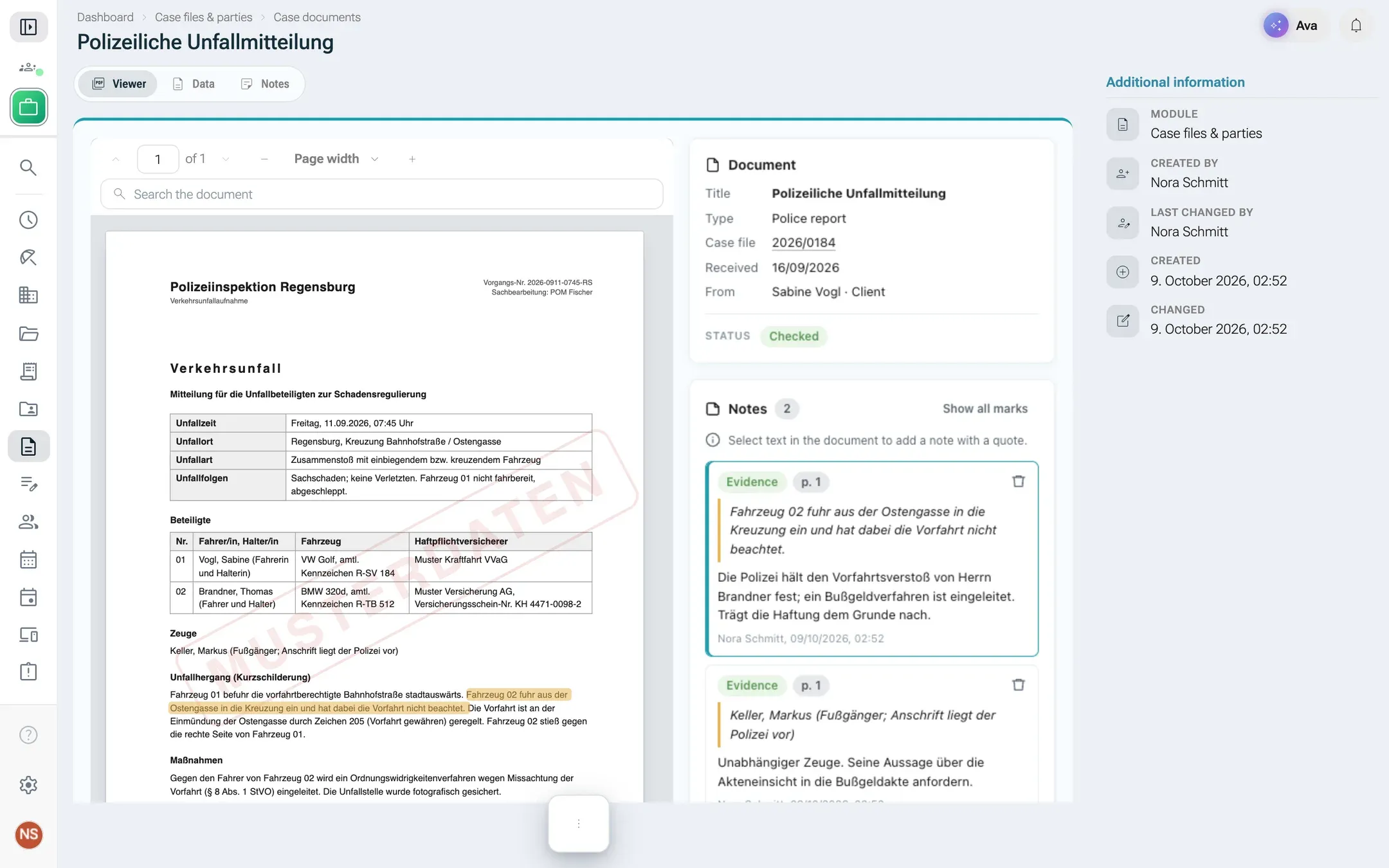
const handle = nx.pdf.mount(document.getElementById('pdf'), { documentId: 88, highlights: [{text: 'binnen zwei Wochen', page: 2}],});handle.on('select', ({page, text, rects}) => showNoteButton(page, text));handle.on('page', page => updatePageLabel(page));await handle.goTo(3);const {total, index} = await handle.find('Zustellung');await handle.setHighlights([{text: quote, page}]);await handle.destroy();- Give the element a size, especially a height:
<div id="pdf" class="nx-pdf-slot"></div>. The viewer follows the element when it moves, scrolls or resizes, and is cut where your scrolling containers cut the element. - Events:
select({page, text, rects}, withrectsas fractions 0 to 1 of the page, origin top left; a cleared selection comes with emptytext),page(the page in view),load({pages}),error({code}).handle.readyresolves when the viewer is mounted. - Highlights match regardless of case and whitespace, across line breaks, and with typographic quotes and dashes typed plainly. Without
page, every occurrence is marked.
Size, keys and dialogs
Section titled “Size, keys and dialogs”- Height follows your content, up to 20 000 px. A
pageview fills the area below its top instead (at least 320 px). Leave<html>at its natural height unless you are a page. - Keys with Ctrl, Cmd or Alt, and Escape, go on to nexxus unless your handler calls
preventDefault(). So Escape closes the dialog of arecord.actionview. - Dialogs (
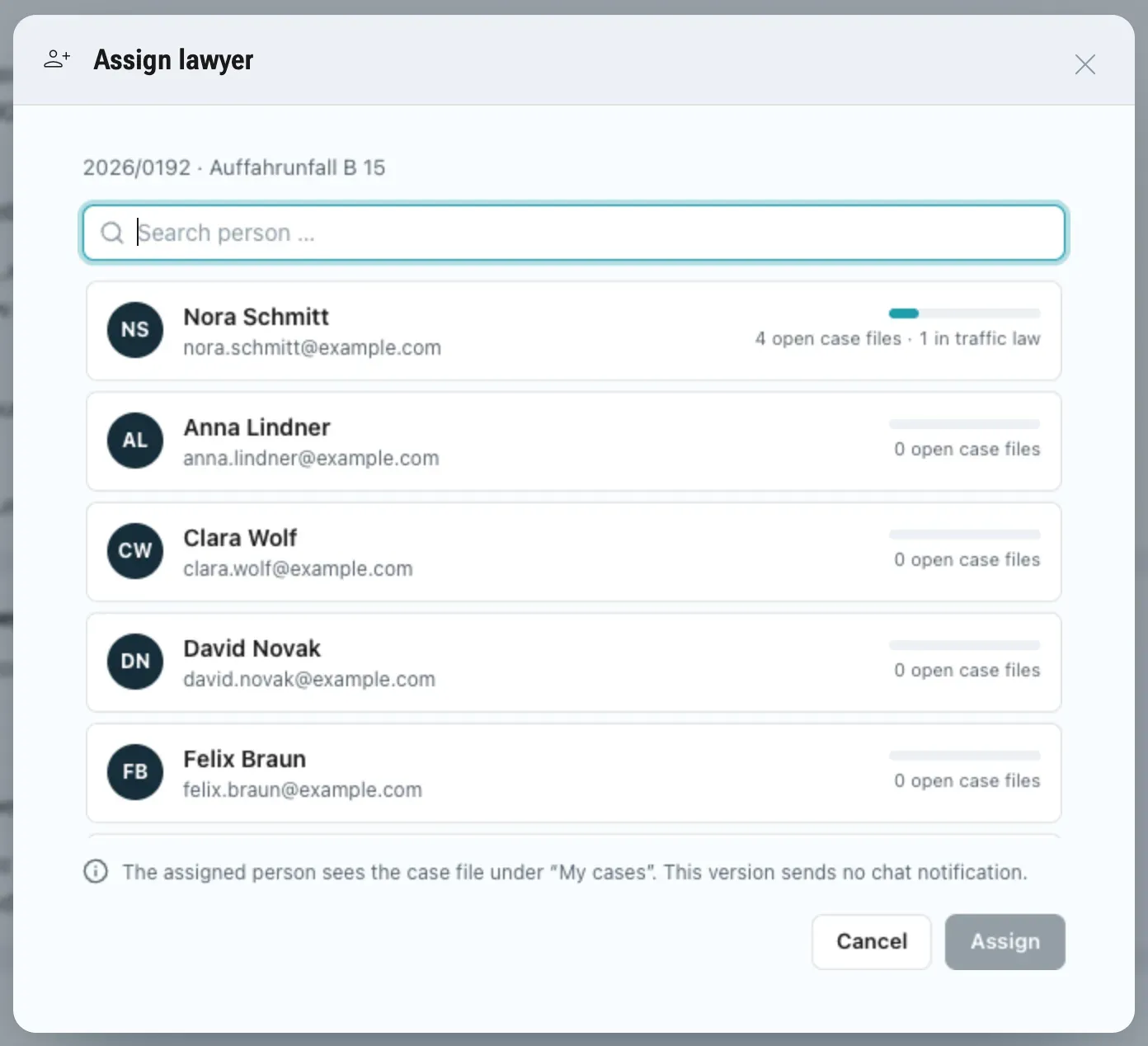
record.action): nexxus draws the dialog header with the view’s label, icon and a close button. Your view draws the body and its own buttons, and finishes withnx.dialog.close(result). Closing the dialog any other way means the action was not carried out. Another view of the module opens the dialog withnx.nav.open({view, id}). - Tiles (
dashboard.widget): nexxus draws the card with icon, label and module name; the view draws only the content. Sizes on a wide screen:sa quarter of the row,mhalf,lthe full row.
Limits
Section titled “Limits”| What | Limit |
|---|---|
| Calls in flight per view | 32 |
| Toasts | 20 a minute, at least 400 ms apart |
nx.storage per person and view | 15 000 characters as JSON; keys [A-Za-z0-9._-], at most 64 characters |
| Record payload per call | 256 KB as JSON |
| View height | 20 000 px |
| PDF viewers per view | 4, with up to 50 highlights of 2 000 characters |
| HTML file | 2 MB |
Views and the AI Assistant
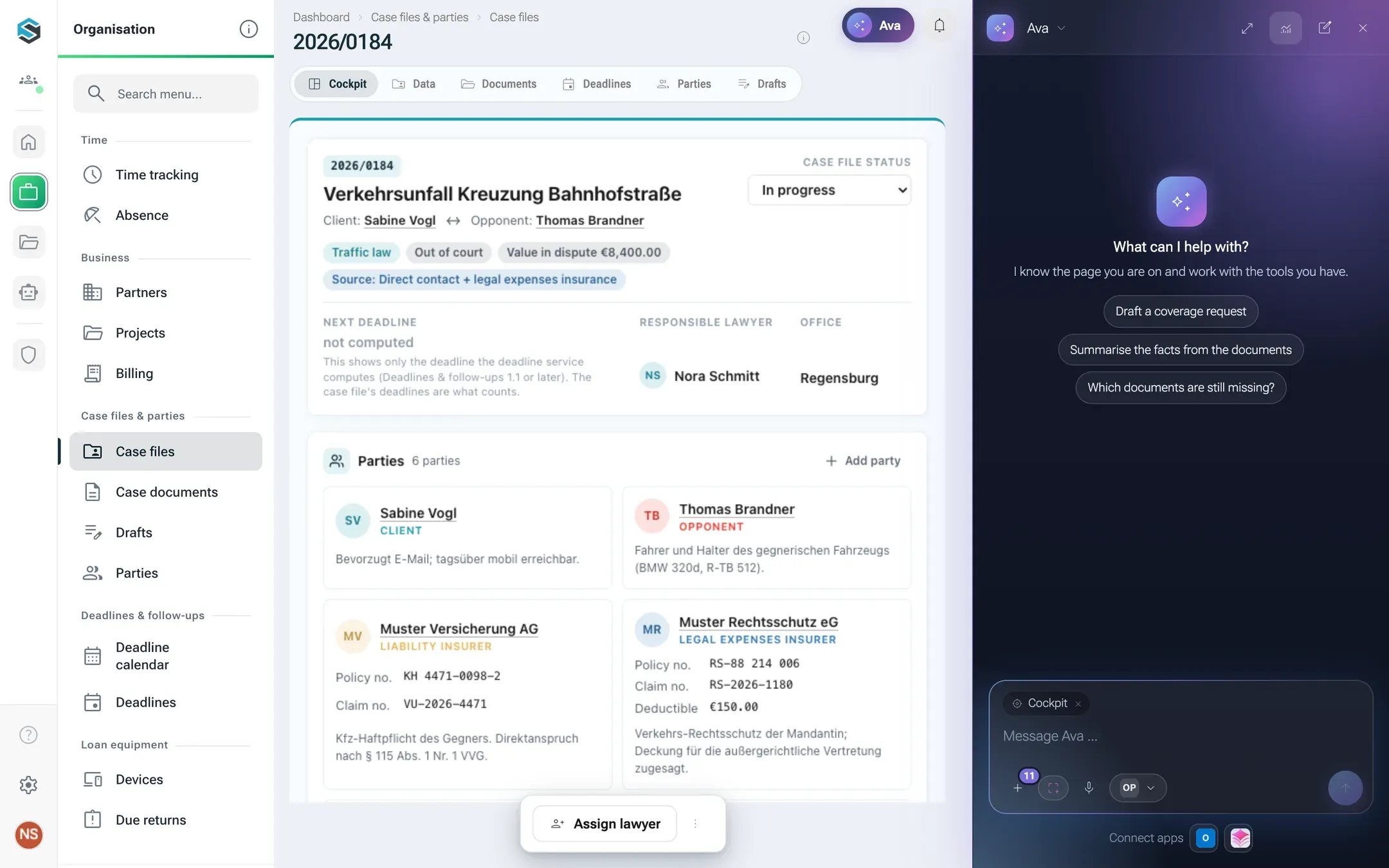
Section titled “Views and the AI Assistant”Package modules bring no chat of their own. The AI Assistant of nexxus works on every package page, and a view can tell it what the view shows.
- On list, record and page views, nexxus already tells the AI Assistant the module, the entity, the record and the view.
nx.assistant.setContext({summary, records})adds what only your view knows, for example “3 devices overdue” with the records behind it. It appears as a chip in the assistant column and goes with every message while the view is on screen.nx.assistant.ask(prompt)opens the assistant column with a new conversation. It works only right after a click or key press in your view, so a view cannot start a conversation on its own.- The example prompts of the manifest (
assistant.promptswith aviewkey) show up as chips in the assistant column when that view is on screen.
How the assistant uses a module’s tools is described in Working with the AI Assistant and Package structure.
The protocol, for debugging
Section titled “The protocol, for debugging”You rarely need this, but it helps when you read the browser’s message log.
- The SDK posts
{type: 'nxm:ready', sdk}to the parent window. - nexxus checks that the message comes from its own frame (
event.source) and answers{type: 'nxm:connect'}with aMessagePort. - Everything after that goes over the port: requests
{t: 'req', id, method, params}, answers{t: 'res', id, ok, result}or{t: 'res', id, ok: false, error}, and events{t: 'evt', name, data}in both directions.
Events from nexxus to the view are init, context, theme, record and pdf.*; from the view to nexxus height, key and pdf.rect. The method names are records.search, records.get, records.create, records.update, records.remove, lookup, invoke, actions.preview, nav.open, ui.toast, ui.confirm, dialog.close, storage.get, storage.set, assistant.setContext, assistant.ask, images.get, pdf.mount, pdf.update, pdf.goTo, pdf.find and pdf.destroy.
Known gaps
Section titled “Known gaps”- No descriptor in the view. A view cannot read the module’s field and enum labels. Repeat the labels you show, with
nx.t({de, en, pl}), and keep them in line with the manifest. - No rights in the view. A view cannot ask whether the person may run an action. Offer the button and show the server’s
FORBIDDENmessage when it comes back, or put the action in the record’s action bar, which nexxus shows only to people who may run it. - No icon font. Use inline SVG.
When something goes wrong
Section titled “When something goes wrong”nexxus shows its own message in place of a view that cannot run:
| Message | Cause and fix |
|---|---|
| “This view could not be loaded.” | The view could not be loaded, for example after a network error. Try again loads it again. |
| “You are not allowed to see this view.” | The person lacks a permission of the module. Give them a role of the package, see Roles. |
| “This view does not exist (any more).” | The view key is not in the installed version, for example after an update removed it. |
| “The module of this view is not active.” | The package is deactivated. Activate it on its package page. |
Inside your own view, the usual surprises are a fetch that the content policy blocks (use nx.records instead), a sort or filter on a field that is not indexed (VALIDATION), and nx.assistant.ask called without a click (NO_USER_ACTION).