
The app (.nxa)
The tool itself: a package with a description file and the screen that draws the content. An app is installed once per tenant and shows up in the app list. It is not a file in your folders.
Apps
Apps are small tools that live in your files. Each app edits one document, the AI Assistant can change that document for you, and your colleagues can work in it at the same time. This page explains how they work and when to use one.
An app is a small tool with one job: a Kanban board, a Markdown editor, a whiteboard, a slide editor. What makes it different from a tool in another browser tab is where its content lives. Everything you put into an app is saved as a document in your files, in the folder you chose, with the same sharing, versions and links as a contract or a spreadsheet.
Take Brandt & Söhne, a mid-sized machine builder preparing a trade fair. The project lead creates a Kanban board in the project folder. The sales team sees it because the folder is shared with them, two colleagues move cards at the same time, and on Friday the project lead asks the AI Assistant to “add a card for every open item from the kick-off minutes”. The board is still one file. Nobody had to set up a separate tool, invite people to it, or remember where the board was.
Every app has two parts, and it helps to keep them apart.
The app (.nxa)
The tool itself: a package with a description file and the screen that draws the content. An app is installed once per tenant and shows up in the app list. It is not a file in your folders.
The document (.nxd)
One piece of content made with the app: one board, one presentation, one set of notes. It is a normal file in Files and carries the name of the app that opens it.
The document is the source of truth. The app only draws it and writes your changes back. That is why the same document opens the same way from the file list, from a link a colleague sent you, or when the AI Assistant opens it for you. A document’s file name follows the pattern <title>.<app>.nxd, so a board called “Messe 2026” is stored as Messe 2026.board.nxd.
Who changes it
The .nxd document
A file in Files, in the folder you chose
What you get
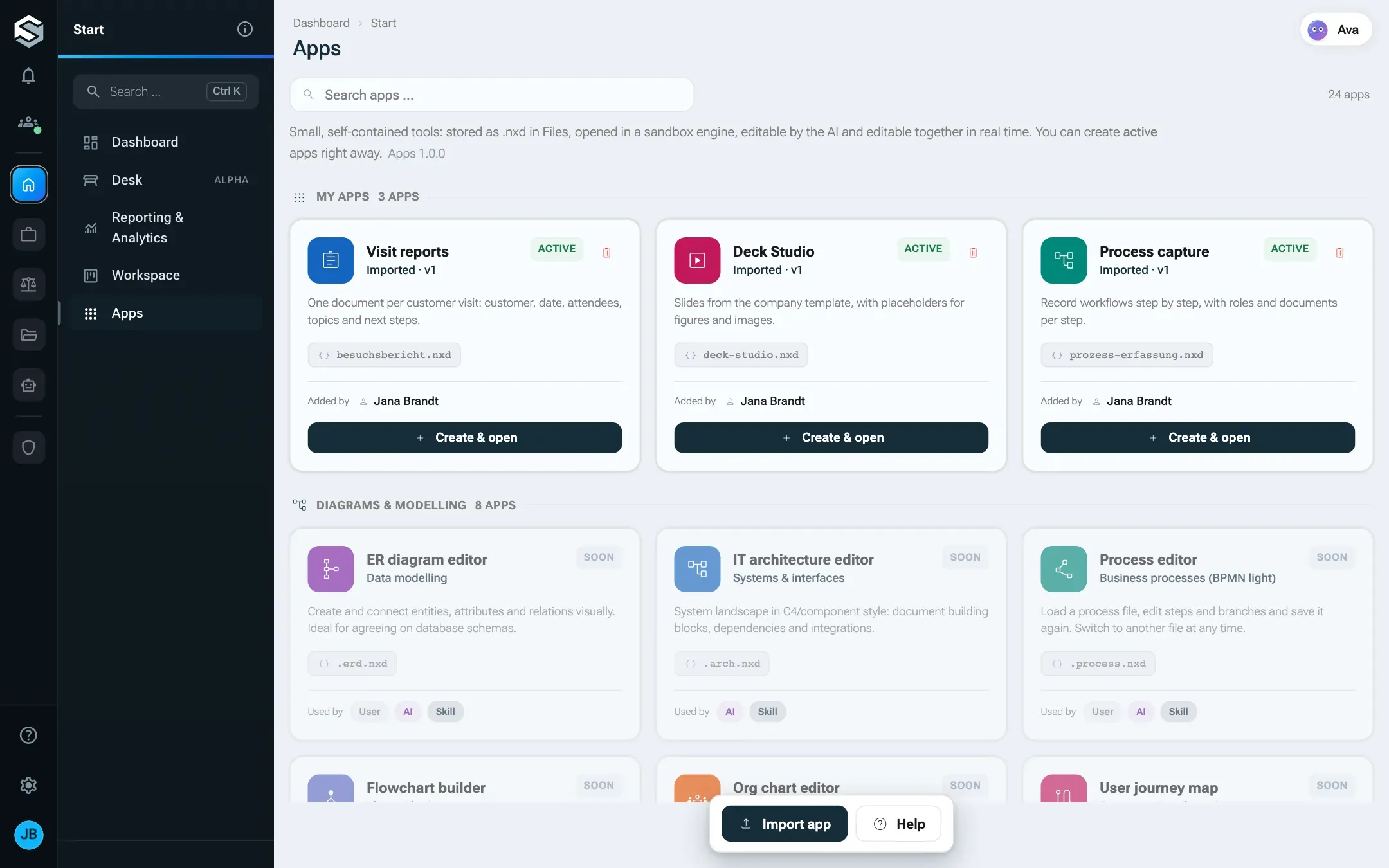
Open StartApps. The page has two parts.
Every other app comes as an .nxa package that someone imports. An administrator’s import is available to the whole tenant and shows Imported on its card. Anyone else who imports an app gets it as their own app, marked Own app: only they and the administrators see it in the list. Documents made with a personal app still open for everyone they are shared with. Create apps without code walks through installing one.
Letting people install their own tools sounds risky. Apps are built so that it is not.
Every app runs in a sealed frame inside the page. It has no access to your session, your cookies or the rest of nexxus, and a content security policy blocks every network request: an app cannot load anything from the internet or send anything out. It sees exactly one thing, the document it was opened with, and it talks to nexxus only through a private message channel.
Two consequences follow from that:
The same rule means an app never depends on a website being reachable. A picture you add to a whiteboard or a slide is stored inside the document itself.
Every app describes its content with a data schema. The AI Assistant reads that schema, together with instructions the app brings along, and changes the document’s data directly instead of writing text about it. The server checks every change against the schema before it is saved, so the AI Assistant can only produce documents the app understands.
You ask
On the open document, for example: group the cards by customer.
The AI Assistant reads the current state
With every message it gets the document as you see it right now, including colleagues' edits.
The server checks
Your edit rights on the document and the app's data schema.
The change appears
Live, for everyone who has the document open. It is saved as a new version.
You can steer this per app. On an app’s page, the card AI instructions shows what the app tells the AI Assistant and lets the app’s owner add an Addendum, for example your house colours or how you name things. The addendum survives new versions of the app. For apps whose content should stay away from the assistant, the switch Assistant for this app turns it off for every document of that app: it can no longer read or change them, even when asked.
Inside some apps you can also point at one element and ask about it. The app hands the selected element to the AI Assistant and puts your question into the chat box. It does not send it: you still choose the model and the wording.
When several people open the same document, each change reaches the others immediately. You see who else is there at the top of the page, and their mouse pointers move inside the app. A colleague who joins later gets the current state from the people already working.
If two people save at the same moment, nexxus merges both versions instead of overwriting one of them, and tells you so. Where you both changed the same thing differently, your version wins on your screen and the other one is kept as a separate version, so nothing is lost. While an app shows a presentation full screen, the others’ pointers are hidden.
Read-only works the same way it does for any file. Someone who may only view a document sees it in the app with View only and cannot change it.
Two things in an app have versions, and they do different jobs.
The document is versioned by Files. There is no save button: a change is stored a moment after you make it, as an intermediate state. A real version is created when you leave the document, or after ten quiet minutes. Every change the AI Assistant makes is its own version. You restore older states from the document’s versions like for any other file.
The app has a version number of its own. When an app is updated, its owner uploads the new package on the app’s page and sees, before confirming, what the new version changes. The page keeps a Version history with who uploaded which version when, and what each version changed. Existing documents are not touched by an app update.
| What | Where | Who |
|---|---|---|
| Open the app list | StartApps, needs the permission dmsApps.read. The roles from the setup wizard don’t include it: an administrator adds it in the role editor | Everyone with the permission |
| Switch apps off for the whole tenant | AdministrationSetupAreas, card Apps & workspace | Administrators |
| Assistant on or off for one app, addendum to its AI instructions | The app’s page, cards Settings and AI instructions | The app’s owner and administrators |
| Light or dark mode of an app | The app’s own switch inside the app. The choice is kept per person and app. | Everyone, for themselves |
| What the AI Assistant may do with apps | The connector Apps with its actions List apps and Build and change apps | Administrators, see Connectors |
| Who may open the page | Role editor, module Apps | Administrators, see Roles |
Switching the area Apps & workspace off removes the menu entry and the app entries under New in Files for everyone in the tenant. The documents stay in their folders. Opening one shows that the apps are switched off, until an administrator turns the area back on. The same area also holds the menu entry Workspace, which disappears with it.
An app’s light or dark mode follows nexxus until you use the app’s own switch. From then on nexxus remembers your choice for that app, and only yours. The content keeps its own look: a slide with a dark theme stays dark.
The assistant’s name is the one setting from your tenant’s branding that apps pick up: if your company renamed the AI Assistant, the buttons and hints on app documents use that name.
Both extend nexxus, for different jobs. An app is a tool for working on one piece of content. An NXM module adds a business area with its own records.
| App | NXM module | |
|---|---|---|
| What it holds | One document per piece of work, stored in Files | Many records of its own types, with fields, lists and filters |
| Typical example | A whiteboard for a workshop, a slide deck, a set of QR codes | Case files and deadlines of a law firm, loan devices of an IT department |
| Who builds it | A business team with the AI Assistant, or a developer, as one HTML file | Developers, as a package with a manifest |
| Who installs it | Anyone, for themselves. Administrators for the whole tenant. | Administrators |
| Rights | The document’s sharing decides who sees and edits | Own permissions and roles |
| Menu | Appears in the app list and under New in Files | Its own menu entries |
| AI Assistant | Changes the document’s data through the general app tools | Can bring its own tools and instructions |
Choose an app when the result is a document that people open, edit and share. Choose a module when you need records that many people work on in lists, with their own rights and workflows.